The Basics of EHR – What Does EHR Stand For?

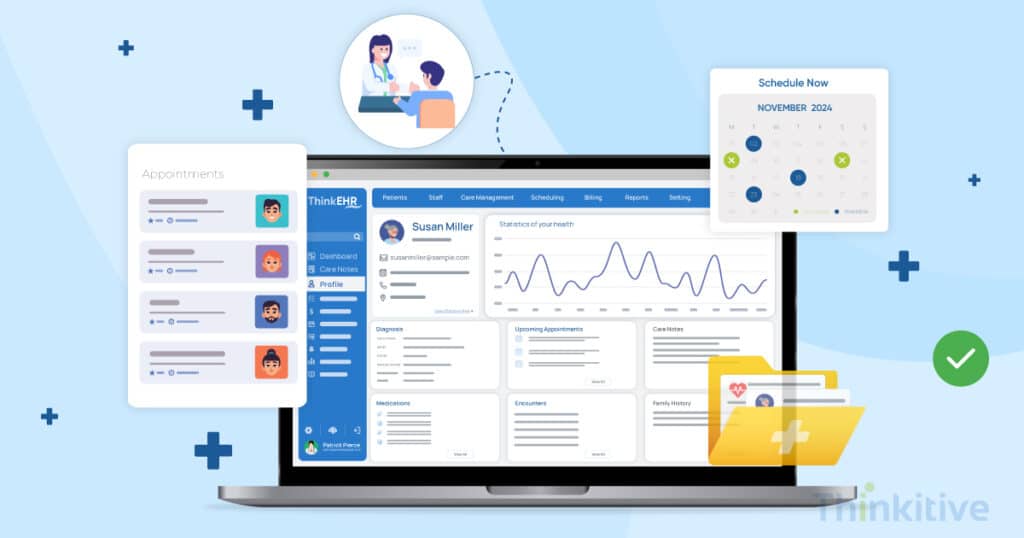
Envisioning healthcare practices without software systems has become impossible in 2026, isn’t it?
Some of the early examples of software systems used in healthcare practices date back to the 1960s to 1972, depending on the source you are referring to. However, the change this has brought to the healthcare industry as a whole has been so significant that every healthcare practice has made the shift from paper-based records to electronic health records.
Having said that, over the last years, the use of software systems in the United States’s healthcare industry have clearly become an integral part. And addressing the different needs of the hospitals, practices and clinics needs, different types of software systems have come up, which varies from telehealth platform to a basic practice management software.
Now, after being in this industry and serving healthcare professionals for more than a decade, a recent trend has been understood. We knew earlier that healthcare providers interchangeably use EHR and EMR, due to their core similarities.
But as the EHR systems have evolved, healthcare providers have started to confuse practice management software with EHR software.
And that is one of the major reasons why I have decided to write this blog – What is EHR? Before you actually move ahead with custom EHR and EMR software development.
On that note, let’s understand what exactly is an EHR software and how it has evolved to be the backbone of a healthcare practice. Along with that, let’s also demystify some contrasting terminologies that you must know as a healthcare provider.
So without further ado, let’s get started!
How EHR Improves Patient Care
Free eBook DownloadThe Basics of EHR – What Does EHR Stand For?
To start with the basics, an EHR stands for Electronic Health Records, which is basically a digital version of a patient’s paper chart. In simple terms, remember the paper-backed files that patients used to carry for care delivery earlier? Well, an EHR exactly that but instead of a paper-backed version it has a digital version stored.
It typically contains all the patient data that varies from their demographics, medical history, previous and existing treatment plans, test results and many more.
Fair enough? Now, let’s address the term interchangeably used with EHR – Electronic Medical Records or better known as EMR.
While they both are similar at the core, there is a fine line difference that sets them apart from each other. You see, an EHR contains the entire medical history of the patient, which contains their healthcare journey with different care providers and specialties. However, an EMR is limited only to the healthcare practice or clinic. Refer to this table below to understand better.
| Feature | EHR (Electronic Health Record) | EMR (Electronic Medical Record) |
| Full Form | Electronic Health Record | Electronic Medical Record |
| Scope | Comprehensive, longitudinal health data across multiple providers | Medical records from a single provider or practice |
| Data Sharing | Designed for interoperability and data exchange | Limited sharing outside the originating clinic |
| Use Case | Continuity of care across hospitals, specialists, and facilities | Internal documentation and treatment within one practice |
| Regulatory Focus | Supports value-based care, population health, and clinical decision support | Mainly focused on diagnosis and treatment documentation |
| Patient Access | Typically allows patient portals and multi-provider access | Usually provider-facing with limited external access |
| Industry Trend | Standard in modern healthcare systems | Becoming outdated or absorbed into EHR systems |
Now that you have a brief idea about what an EHR and what an EMR, let’s move on to the benefits of having an EHR or EMR system for your practice.
- Accuracy in data due to automation and synchronized systems.
- Efficiency is improved as data is always available for both patients and providers.
- Accessibility of patient information is improved which was observed as a major set-back with paper-backed patient records.
The Crucial Distinction: EHR vs. EMR vs. PHR
There is another term that has been interchangeably used with EHR and EMR – Personal Health Record (PHR). Since we’ve already covered what an EHR and EMR is, let’s first understand the core concept of PHR and see how it differs from EHR.
So, a PHR or Personal Health Record is similar to an EHR. It also stores patient data, medical history, treatment plans, test results, etc. However, the core difference between EHR and PHR is that PHR is managed and controlled by patients themselves, through patient portals or apps that aggregate data.
For better understanding and differences between EHR, EMR and PHR, refer to the table below:
| Feature | EHR (Electronic Health Record) | EMR (Electronic Medical Record) | PHR (Personal Health Record) |
| Full Form | Electronic Health Record | Electronic Medical Record | Personal Health Record |
| Owner / Maintainer | Healthcare organizations (hospitals, clinics) | Single physician or medical practice | The patient |
| Scope of Data | Complete health data across multiple care settings | Medical history within one clinic or provider | Health information patients collect themselves |
| Data Sharing | Designed for interoperability and exchange between providers | Limited data sharing outside the originating facility | Sharing is controlled by the patient |
| Access | Providers + patients via portals | Mostly providers within the same clinic | Patient-controlled apps or portals |
| Primary Use | Care coordination, clinical decision support, population health | Diagnosis/treatment documentation within single practice | Self-tracking, monitoring, emergency info, wellness activities |
| Examples of Data | Lab results, medication history, allergies, care plans from many providers | Visit notes, prescriptions, treatment records from one doctor | Fitness data, past medical history, immunizations, wearable device data |
How an EHR Works: Core Components & Data Flow
Definition wise, you know that EHR stores patient information and stores it for enhanced accessibility, accuracy, etc. Here are some of the core components of an EHR system:
- Data Capture: The basic data is initially manually entered into the EHR and it can be automatically imported to another system or updated with integration with different healthcare systems such as labs, pharmacies, etc.
- Data Storage: After capturing the data, it stores it safely and securely for instant accessibility. Depending on the system, you can either store it on cloud or on on-premise databases.
- Data Retrieval: EHR also extracts specific patient information from the digital system using several methods like direct database extracts, querying data fields, NLP, etc.
For data retrieval and sharing an important aspect that you need to ensure that your system is capable of is interoperability. With adherence to the HL7 and FHIR standards, your system can communicate with other disparate healthcare systems and exchange information in the right manner.
Furthermore, as mentioned earlier, EHRs have been evolving, the inclusion of patient portals being the reason for this. It allows patients to access their health information and even contribute to the data. Adding more to the functionalities of EHRs reporting and analytics tools can also be added.
Transform Your Practice with EHR
Read EHR Success StoriesWhy EHR is Essential For Healthcare Providers
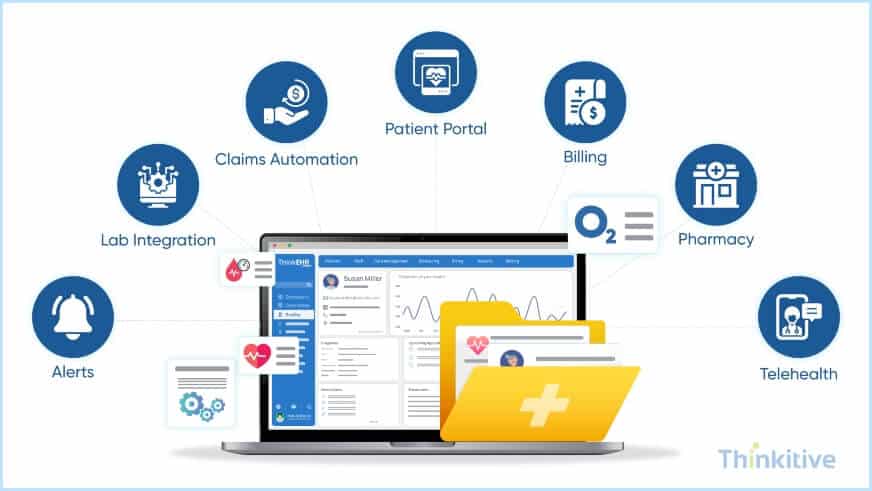
For healthcare practices, the electronic health record software, apart from storing patient data, also acts as a medical data management system. Meaning, it can streamline the process from where the data is being enrolled into the system and where it is going. This consists of both clinical and non-clinical activities such as automatically notifying the provider when the lab results are updated by the lab specialists. On the other hand, non-clinical activities include claims submission, etc.
Focusing on the clinical aspects, electronic health records automation, real-time alerts, and communication channels in electronic health records software allows providers to make informed decisions and deliver better care to improve patient health outcomes.
However, to achieve this, you need to consider EHR software design and implementation to align with the integration requirements. While telemedicine and EHR integration have become a necessity for care delivery, for a complete care experience, you also need to integrate your EHR software with other systems like test laboratories, pharmacies, and billing systems.
These integrations not only makes care delivery more efficient but also benefits the healthcare staff by reducing paperwork, eliminating errors and simplifying communication between providers as well as patients.
Practice Transformation with EHR
Read Case StudyKey Features of an Effective EHR System
When it comes to EHR system development for healthcare or any IT software system for that matter, the features of the software defines its functionality. So, here are the key features of effective EHR software as a patient records management solution.
- Patient Information Management: The main function of an EHR system is to store patient information such as their demographics, medical histories, allergies, past and current medication, etc. For this, apart from developing specialized dashboards, etc., your system also needs to achieve data interoperability in EHR systems in order to exchange data and communicate with other disparate healthcare systems.
- Clinical Tools: Along with storing patient information, you would also need clinical tools to move ahead with patient care delivery. Here, clinical tools like e-prescribing, decision support, and clinical decision tools can come in handy. These tools not only enhance the decision-making process but also simplify the roadmap for further processes.
- Data Security: Given the sensitive nature of patient health information stored in your EHR system, you need to ensure that data’s privacy and ethical use. EHR system security features like role-based access control, encryptions, etc., can be one of the best ways to do it. Or you can adopt a HIPAA-compliant EHR system development best practices to address that security and gain patient trust in your virtual or digital care practices.
- Interoperability: Even though we discussed interoperability earlier, it is one of the crucial features of your electronic health record software. Only after achieving interoperability does your system get the ability to exchange data with other healthcare systems, such as labs, hospitals, etc., and make sense of that data.
- Reporting and Analytics: Since your EHR system is basically a medical data management system, it can also be used to identify patterns and trends in patient health information, which it can report with analytics. This is a crucial feature that you can use to improve patient care practices and improve outcomes.
Custom EHR Features Checklist
Free DownloadBenefits of Custom EHR Software Development
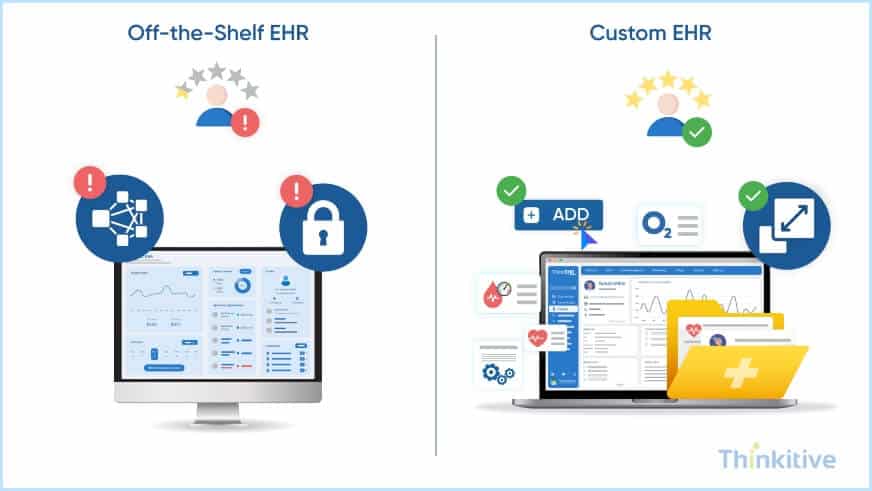
There is a good reason why many healthcare practices are opting for EHR application development for hospitals and clinics. The factor of limited customizations and scalability options are some of the major drawbacks of off-the-shelf EHR software.
The factor that forced the shift to custom EHR software development is their inability to meet the specific needs and requirements of each practice. Since every healthcare practice works and functions in a unique way that works best for them, only with custom EHR software development were they able to address their problems.
To simplify those reasons for you, here are the exclusive benefits that you get with only EHR software development:
- Tailored to Specific Workflows: Off-the-shelf EHR software comes with pre-defined features and allows near-to-no customization options. This makes it difficult for clinics or practices to align their workflow with the software. On the other hand, with custom EHR software development, you don’t need to change the workflow to align with the software. Furthermore, as the practice grows, its scalability features make it flexible to adhere to the growing needs of the practice.
- Integration with Existing Systems: Another benefit of custom EHR software development is its ability to seamlessly connect with the existing software systems used in your healthcare practices. For instance, with customization and integration strategies, the software can easily connect with your practice management system, telemedicine platforms, etc.
[Tip – This ultimate development guide for you to develop robust EHR software for your practice going forward in 2025]
Looking for Custom EHR Software Development?
Get Free ConsultationThe Challenges of EHR Implementation
Now, given the trends of EHR adoption in healthcare practices, custom EHR seems to be an favourable option for your practice. With a custom EHR software, you not only get to design the software the way you want but also align it specifically with your clinical and administrative needs.
However, there are certain challenges that you’re likely to encounter when implementing an EHR system. Let’s what these challenges are and how we can overcome them:
- Implementation Cost: Custom EHR software development requires a higher upfront investment as compared to off-the-shelf EHR software. The best way to overcome it is to develop a MVP EHR and scale it as per your needs or you can adopt a pilot rollout so that you can test, verify and effectively develop a complete software.
- Training/UX: User experience and usability of the software are another criteria that determines the success of your EHR software. Adopt best practices for UX and include your actual users when designing and also give them hands-on training to help them use the software effectively and efficiently.
- Data Migration: If you are migrating data from your legacy system to a new EHR, then adopt best practices for migration strategy and ensure that the data is transferred accurately and fully.
- Interoperability Gaps: There are bound to be interoperability gaps, and that’s the reality. However, to overcome these gaps, adopt HL7 FHIR standards for integration and initially only integrate your system with necessary, followed by the rest as your scale.
Implement EHR System Seamlessly
Download Free GuideHow EHR Improves Patient Care & Safety
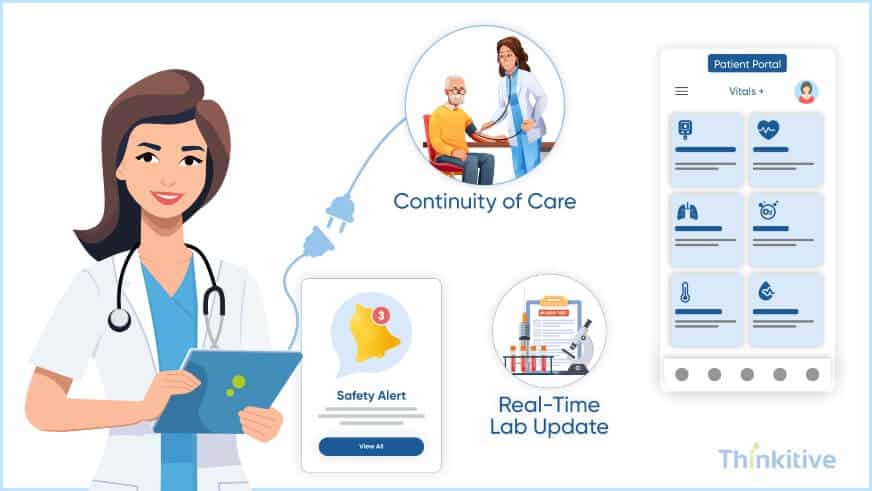
Another benefit of electronic health records software that has become the USP of its ability to directly contribute to better patient outcomes. With electronic health records automation features, the medication errors are minimized, which can be even seen in prescriptions and drug interaction checks. This increases patient safety and allows better patient care practices.
Along with that, with a well-kept record of patient care journey, with EHR software, providers can ensure continuity of care with real-time updates. This way, even if the patient consults multiple, proper care can be delivered without any delays. This increases accuracy in diagnosis, treatment, and even care plan curation. Moreover, the factor of ongoing medication can also be considered to deliver care in a more personalized and efficient manner.
Last but not least, with the feature of a patient portal, EHR explained can be pretty simple, you see, with a patient portal you actually allow your patients to take control of their health. With the increase in accessibility of their own health data, they are empowered and proactively participate in their care journey, taking an active part in decision-making.
Impact of Custom EHR on Patient Safety
Read Case StudyConclusion
In summary, EHRs have become the epicenter of the modern-day healthcare landscape, the effectiveness it has brought to the already burdened healthcare landscape can literally change the way we see healthcare.
Being in the transition stage, it is the right time to make a custom system, which can help you customize your software system to address your unique needs and requirements. So, what are you waiting for? Take a leap of faith and book a demo to see how a custom EHR or EMR software would work for your practice.
Frequently Asked Questions
An Electronic Health Record (EHR) is a digital version of a patient’s medical history, maintained by the provider over time. It includes key administrative and clinical data, such as demographics, progress notes, medications, vital signs, and lab results. EHRs streamline workflows, improve care coordination, and enhance decision-making for better patient outcomes.
Key features of an EHR system include:
- Secure storage and access to patient health information: EHRs provide a centralized repository for all patient medical records, including medical history, medications, allergies, and test results. Furthermore, with a cloud-based EHR development, you can improve the access to PHI allowing authorized personnel to access data from anywhere and at any time.
- Improved communication and collaboration: EHRs facilitate seamless communication between healthcare providers, enabling efficient coordination of care and reducing the risk of errors.
- Enhanced decision-making: EHRs often incorporate clinical decision-support tools that provide evidence-based recommendations to assist healthcare providers in making informed decisions.
- Streamlined administrative processes: EHRs can automate many administrative tasks, such as scheduling appointments, generating billing statements, and managing patient referrals.
- Improved patient engagement: EHRs can empower patients by providing access to their health information and enabling them to actively participate in their own care.
- Data analytics and reporting: EHRs can generate valuable insights from patient data, helping to identify trends, improve quality of care, and support population health initiatives.
- Interoperability: EHRs can exchange information with other healthcare systems, facilitating seamless care coordination across different providers and settings.
While both EHR and EMR are digital versions of patient health records, the key difference lies in their scope. EMRs are primarily used within a single healthcare organization, focusing on storing a patient’s medical history within that specific practice. On the other hand, EHRs are designed to be interoperable and shareable across multiple healthcare providers and settings. This allows for a more comprehensive and longitudinal view of a patient’s health information, facilitating better coordination of care and improving overall patient outcomes.
EHR systems employ robust security measures like encryption, access controls, and regular updates to safeguard patient data. However, no system is completely risk-free. Data breaches can still occur, highlighting the importance of ongoing vigilance and proactive security practices by healthcare providers.
HIPAA (Health Insurance Portability and Accountability Act) is a US law protecting patient health information (PHI). EHR systems (Electronic Health Records) store PHI, making them subject to HIPAA regulations. HIPAA mandates security measures to safeguard PHI within EHR systems, ensuring patient privacy and data integrity.
The cost of developing a custom EHR system can vary widely based on factors like complexity, features, and integrations. It typically ranges from $50,000 to $250,000. Additional costs may include hardware, software, implementation, and ongoing maintenance.
Developing a custom EHR system can take anywhere from 6 months to 2 years, depending on the complexity and size of your healthcare organization. Smaller practices may be able to implement an EHR system in 6-12 months, while larger hospitals may require 18-24 months or more. The key factors that impact the timeline include the size of your organization, the complexity of your workflows, and the number of integrations required.
Common EHR implementation challenges include high costs, resistance to change, workflow disruptions, data privacy concerns, lack of interoperability, insufficient training, and technical issues.
Cloud technology enhances EHR systems by providing remote access to patient records, enabling real-time collaboration among healthcare providers, and offering cost-effective scalability and improved data security. This leads to improved patient care and operational efficiency.
EHR systems streamline healthcare workflow by centralizing patient data, automating tasks, improving communication, reducing paperwork, and enabling data-driven decision-making, ultimately leading to improved efficiency and patient care.
Custom EHR systems benefit healthcare providers with unique workflows or specialized needs. This includes niche specialties, large clinics, and those prioritizing patient experience. They offer tailored features, seamless integration, and enhanced data security to improve efficiency and care quality.
EHR systems enhance patient engagement by providing secure patient portals for accessing health records, scheduling appointments, and communicating with providers. They enable personalized care plans, medication reminders, and educational resources. EHRs also facilitate timely appointment reminders and automated appointment scheduling, improving communication and reducing missed appointments.
EHR systems are set to become even more integrated into healthcare, with a focus on interoperability, AI-driven insights, and patient-centered design. They will streamline workflows, improve data accessibility, and empower patients to take an active role in their health management.


