Why the EHR Should Be Specific to Your Workflows & Clinical Needs

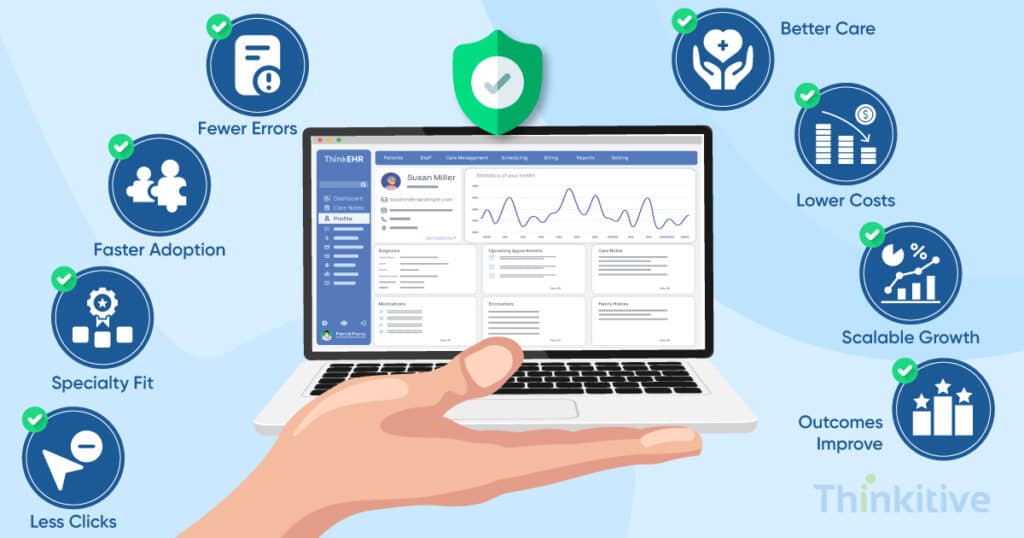
The outlook of healthcare practices is changing. You see, when you enter a hospital or a clinic, one of the first things you’ll notice is how much time providers spend interacting with their EHRs.
This observation of mine brought me to the internet to search for backing for my claims. Now, the interesting part is that the internet is filled with extraordinary stats that I could pick to back my observation. However, finding a reliable one in the pool of abundance, a Jama Network study showed that only 25% of the family physicians are satisfied, while the other 75% are either very dissatisfied or somewhat satisfied.
Some studies even suggested that in 2022, a survey of the VA Medical Center showed that 92.5% of staff directly blamed EHRs for inefficient work, increased documentation time, and the list goes on. And at Thinkitive, while speaking with prominent healthcare providers around the world, this seems to be a persistent problem, which has become one of the reasons for the increasing adoption of customizable EHR systems.
But why does the solution to an EHR problem lie with another EHR?
Well, if you think a little logically, then every practice is different and works in a fashion that is unique to that facility. That is the reason why your EHR should be aligned with your practice, not the other way around, with the ability for EHR workflow customization.
Having said that, let’s see why your EHR should be specific to your workflows and your EHR clinical workflows needs. So, without wasting any more of your time, let’s deep dive.
Assess Your EHR System for AI Compatibility & Readiness
Take AssessmentKey Takeaways
- A customizable EHR should adapt to your clinical and administrative workflows—not force your team to adapt to the software.
- EHR workflow customization reduces unnecessary clicks, documentation burden, and physician burnout.
- Aligning EHR design with clinical processes improves usability, patient safety, and staff productivity.
- Successful workflow customization starts with assessment, collaborative design, phased implementation, and continuous optimization.
- Optimized workflows improve long-term ROI through better adoption, efficiency, and clinical outcomes.
Why One Size Doesn’t Fit All: The Hidden Costs of Generic EHR Systems
Well, to answer this question in one line, then it is already answered in the introduction section. But let’s understand this in the context of an example here.
- Productivity Loss
Let’s assume that instead of a generic healthcare practice, you have a specialty practice, catering to healthcare services. Now, depending on the specialty and care delivery processes, you decide on the documentation and other aspects, right? Well, typically in an off-the-shelf or generic EHR, that option is not available. Rather, you are fixed to one particular process, which might disrupt everything. Also, the documentation increases, taking up to 2 hours for accuracy.
- Clinical Workflow Disruption
Suppose your current EHR doesn’t match your clinical processes, and the generic EHR you’re using is curated with respect to that of a generic clinic. This not only creates safety risks, but also leads to fatigue for providers who are using these systems on a day to day basis. This not only creates gaps in communication but also increases the chances of data entry errors across departments.
- Staff Burnout & Turnover
If you’ve been thoroughly reading this article, then it is not hard to figure out that EHR frustration is one of the leading causes of physical burnouts. The pyjama time these healthcare providers have been giving to the documentation process is slowly creating dissatisfaction. And these factors impact recruitment and retention rate.
- Patient Care Compromise
Care journey for a patient is about experience, and unaligned workflows compromises that with reduced face-to-face consultation time and delayed treatment, etc. This drastically impacts your care delivery process and creates enormous dissatisfaction levels.
If you’ve made it till here, then you know that the cost of EHR development crucially depends on various factors, right? So, here is the complete cost breakdown of you in our blog – Custom EMR Development: Complete Cost Breakdown.
Every Healthcare Practice Has Unique Workflow Requirements
Although every healthcare organization follows the same broad patient journey—from patient registration and documentation to treatment, billing, and follow-up—the way these workflows are executed varies from one practice to another. A customizable EHR should adapt to these differences rather than forcing clinicians to work around rigid software.
Whether it’s documentation preferences, approval processes, communication flows, or administrative tasks, EHR workflow customization helps improve efficiency, usability, provider satisfaction, and long-term clinical workflow optimization.
If you’re looking for specialty-specific workflow examples and customization strategies, read our guide on How Specialty Clinics Can Design EHR Workflows.
Clinical Decision Support Built on EHR Workflow Customization
While the majority of the people using EHRs will be for consultations, here are some of the features in a custom EHR that you can have as clinical decision support.
[Make note: These features are highly encountered during care planning and clinical use, and at times, they can have a direct impact on your administrative side as well.]
- Customized Alert System: This feature again consists of developing an entire system with features such as role-based alert filtering, severity-based patient prioritization, context-based notification and the most important part, a learning algorithm which continuously learns from itself. This will ensure that every important reading, or development about the patient’s health reaches you at the right time so that the right care can be provided.
- Integrated Clinical Pathways: Clinical pathways vary across healthcare organizations based on their care delivery processes, but the same on the macro level. You see, you will need to develop condition-specific workflows for specialties you serve and automated task-assignment for your staff. Even a progress tracking dashboard and deviation alert system can be initiated with evidence-based recommendations for clarity.
- Predictive Analytics Integration: Including this feature can be like building a complete virtual care ecosystem and turning your care approach from reactive to proactive. Some of the essential features are risk stratification models, readmission prediction models, resource utilisation forecasting, and population health management tools.
Workflow Optimization Through Intelligent Automation
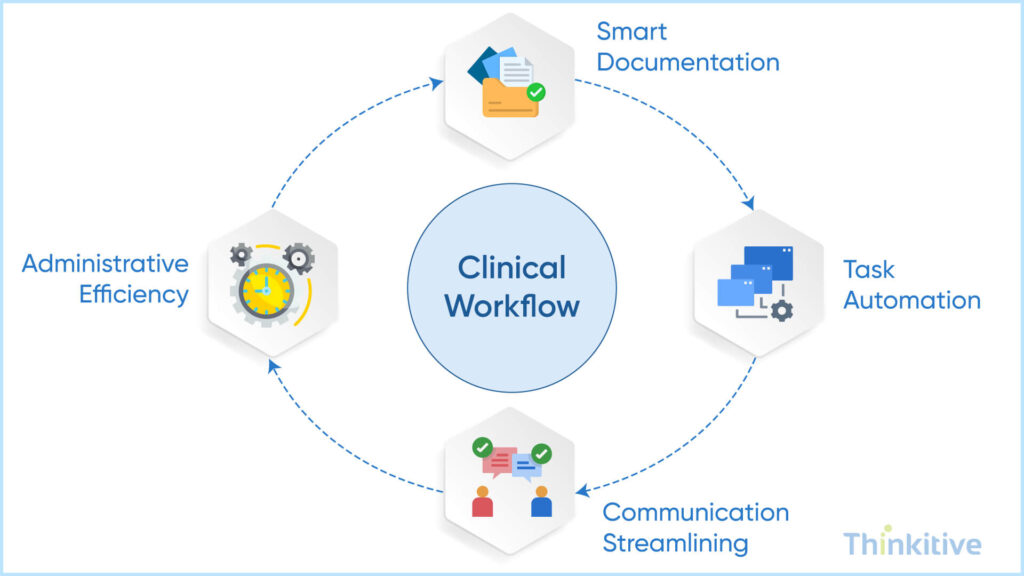
Now, after telling you about the administrative part, it would be really unfair not to at least touch on some parts of it. So, workflow optimization means automating certain aspects or procedures to make doing that particular task easier. While achieving this in healthcare seems too much, if you find the proactive ways of using it in your customizable EHR, then it can do wonders.
Let’s see some with examples:
- Smart Documentation Features: Let’s assume a provider is documenting a patient encounter during consultation and he needs to document something about the condition of the patient during consultation. In such a context, voice-to-text with medical vocabulary can be extremely useful and coupling that with AI-assisted contextual auto-complete programs can ease out a lot of documentation efforts by auto completing the documentation processes based on the clinical context. Furthermore, with AI-driven template learning features your clinicians can be relieved at least for documentation. For instance, this feature makes your template smarter and it learns from its continuous use and the patterns that particular clinician follows. Meaning, next time they want to document, the template will automatically suggest things based on the data it will get.
- Task Automation: Automatic routing of lab results to the respective EHRs won’t keep the administrator waiting during the billing aspect. Or the prescription renewal workflows won’t keep the pharmacist empty. The insurance verification process can also be automated with insurance verification automation to speed up the onboarding process.
- Communication Streamlining: Given your development in this direction of development, streamlining communication plays a crucial role. In these features like role-based messaging, automated handoff summaries can be crucial for provider-patient communication. Furthermore, with integrated team collaboration and patient portal automation, certain aspects of communication between your practice and patients can be automated.
- Administrative Efficiency: The features that can bring efficiency to your administrative processes specifically are the billing code suggestions system for billing processes, or an automated prior authorization mechanism during the onboarding or on specific care episodes. Even the quality reporting automation to ensure care provided is quality and not compromised, and compliance documentation to ensure ethical practice of software systems during care delivery to protect you from necessary compliance.
Calculate the ROI of Automating Your Clinical & Administrative Workflows
Calculate ROIMeasuring Success: KPIs for Workflow-Aligned EHR Systems
Once your workflow-aligned EHR is deployed, the next question is: how do you measure whether it’s actually improving clinical and operational performance?
Well, here are some of the pointers that will help you measure the success of your custom EHR software.
- Efficiency Metrics
The claim that not just us, but any custom EHR development company would make is that the software will improve your efficiency. Here is how you can measure it. Increase in documentation time per patient. Reduced the number of clicks, the time taken by the provider to complete a particular task, and the system navigation time per user.
If you see improvement in this, then understand that the software project is a success.
- Clinical Quality Indicators
If you have been reading this blog closely, then you must have read about improving your care delivery quality using a customizable EHR. Here is how you can measure the clinical quality indicators, for instance with care gap closure rates, protocol adherence scores to ensure standard procedure is followed and error reduction statistics and decrease in patient safety metrics. An improvement in these scores can ensure that the custom EHR software ventures have indeed improved the quality of care delivery.
- User Satisfaction Measurements
While this can be conducted manually, since your system can also assess itself, an increase in the physician satisfaction score would mean they are comfortable using it. The same goes with nurses and how much time the staff is spending on it can also be metric.
- Financial Impact Analysis
Since we have been talking about customizable EHR improving the administrative aspects, let’s see how:
Since the installation of your own EHR software, if you observe that your practice’s revenue cycle has improved due to coding accuracy then it’s indeed an improvement. Other ways that can also indicate its success are reduction in denial rates.
How Do You Align EHR Design with Clinical Workflows?
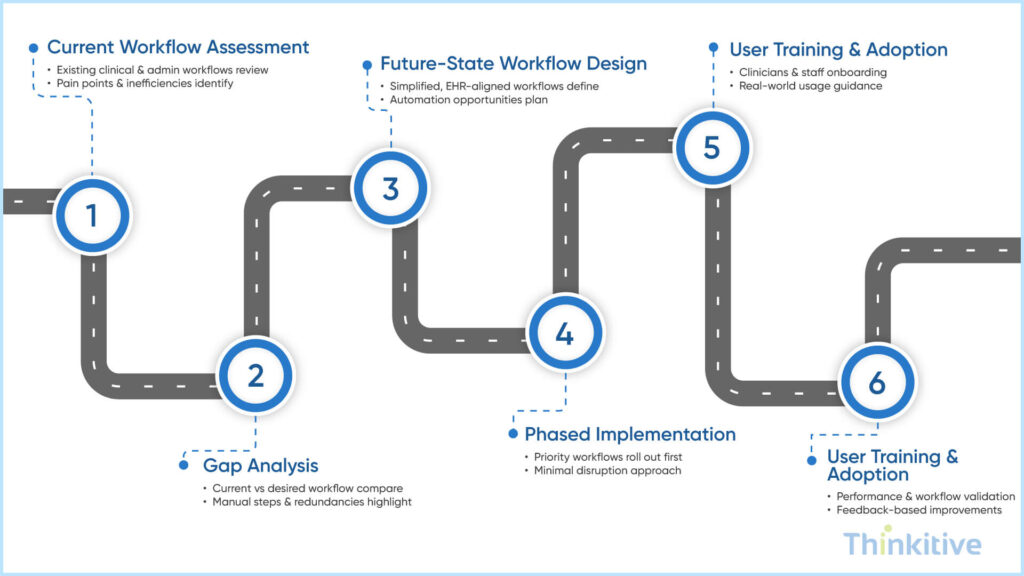
1. Current Workflow Assessment
- Review existing clinical and administrative workflows.
- Identify documentation bottlenecks, inefficiencies, and pain points.
- Gather feedback from physicians, nurses, and administrative staff.
2. Gap Analysis
- Compare current workflows with your desired future state.
- Identify redundant tasks, manual processes, and workflow gaps.
- Prioritize improvements that deliver the highest operational impact.
3. Future-State Workflow Design
- Design role-based workflows around actual clinical processes.
- Create prototypes and validate them with end users.
- Ensure workflows support both current and future operational needs.
4. Phased Implementation
- Launch with an MVP to minimize disruption.
- Roll out features in phases based on organizational priorities.
- Support adoption with change management and structured deployment.
5. User Training & Adoption
- Train clinicians and staff on the new workflows.
- Provide real-world usage guidance and documentation.
- Encourage early feedback to improve user confidence.
6. Continuous Optimization
- Monitor workflow performance using analytics.
- Collect ongoing user feedback.
- Refine workflows and introduce improvements as clinical needs evolve.
Step-by-Step Custom EHR Development Roadmap Guide
Download GuideConclusion
If you have been reading this blog carefully, which I hope you did, then I think I might have convinced you with enough evidence or let’s say how a custom EHR software development can transform your practice by being specific to your practice.
Also, if you’re in a transition stage then considering as a short-term investment turn long can be a win-win situation for everyone. Having said that, the major reason for why you should switch to a custom EHR is to save time, reduce burnout and ensure better patient care delivery.
On that note, let’s see how an EHR development company can develop a customizable EHR in your practice with a free assessment.
Frequently Asked Questions
EHR workflow customization is the process of configuring an electronic health record system to match the way your healthcare organization delivers care. Instead of forcing physicians and staff to follow rigid software processes, a customizable EHR adapts to your clinical, administrative, and documentation workflows.
This includes customizing patient intake, charting templates, order sets, task routing, alerts, approval workflows, billing processes, and role-based dashboards. By aligning EHR design with clinical processes, healthcare organizations can reduce unnecessary clicks, improve provider productivity, minimize documentation burden, and enhance the overall patient care experience.
A generic EHR is built for the “average” healthcare organization. It forces clinicians to adapt their clinical processes to predefined screens, fields, and navigation paths—often resulting in workarounds and inefficiencies.
In contrast, custom EHR workflows are designed around how care is actually delivered in your organization. With EHR workflow customization, documentation flows, order sets, and clinical actions follow real-world steps instead of rigid templates. This makes EHR clinical workflows more intuitive, faster to use, and far more relevant to each role and specialty.
Burnout often comes from cognitive overload—not just long hours. Poorly designed systems increase clicks, force redundant data entry, and interrupt clinical thinking.
By reducing physician burnout through custom EHR workflows, clinicians spend less time navigating software and more time practicing medicine. Clinical workflow optimization removes unnecessary steps, auto-populates data, and aligns screens with decision-making moments. The result is less frustration, fewer after-hours charting sessions, and improved job satisfaction.
To truly understand how to align EHR design with clinical processes, organizations must start before a single line of code is written:
- Clinical workflow mapping of current-state processes
- Identification of inefficiencies, handoff delays, and data gaps
- Collaboration with physicians, nurses, and admin staff
- Designing role-based EHR workflow design prototypes
- Iterative testing with real clinical scenarios
This approach ensures the technology adapts to care delivery—not the other way around.
A customizable EHR improves clinical efficiency by aligning software with the way providers actually deliver care. Instead of forcing clinicians to follow rigid workflows, it automates repetitive tasks, simplifies documentation, reduces unnecessary clicks, and streamlines communication between clinical and administrative teams.
By supporting role-based workflows, intelligent automation, and customized documentation templates, healthcare organizations can reduce physician burnout, improve productivity, enhance patient safety, and deliver a better care experience while maximizing long-term operational efficiency.
While custom solutions may have higher upfront costs, custom EHR workflows significantly improve long-term ROI. Faster documentation, reduced errors, fewer support tickets, and improved clinician retention all contribute to measurable savings.
Effective EHR workflow customization also increases throughput, improves billing accuracy, and reduces dependence on costly third-party add-ons. Over time, clinical workflow optimization turns the EHR from a cost center into a performance driver.
Workflow mapping provides clarity. Without it, development teams risk digitizing inefficiencies instead of eliminating them.
By mapping workflows first, organizations define what success looks like for EHR workflow design. This step ensures that custom EHR workflows reflect real clinical priorities, reduce unnecessary steps, and support future scalability. It also minimizes rework, scope creep, and clinician dissatisfaction post-launch.
Every extra click represents friction. Clinical workflow optimization streamlines navigation by grouping related actions, automating repetitive entries, and eliminating irrelevant screens.
Through thoughtful EHR workflow customization, doctors can complete common tasks—like charting, ordering, and reviewing results—in fewer steps. Optimized EHR clinical workflows reduce interaction time with the system, allowing clinicians to stay focused on patient care instead of software mechanics.


