Why the EHR Should Be Specific to Your Workflows & Clinical Needs

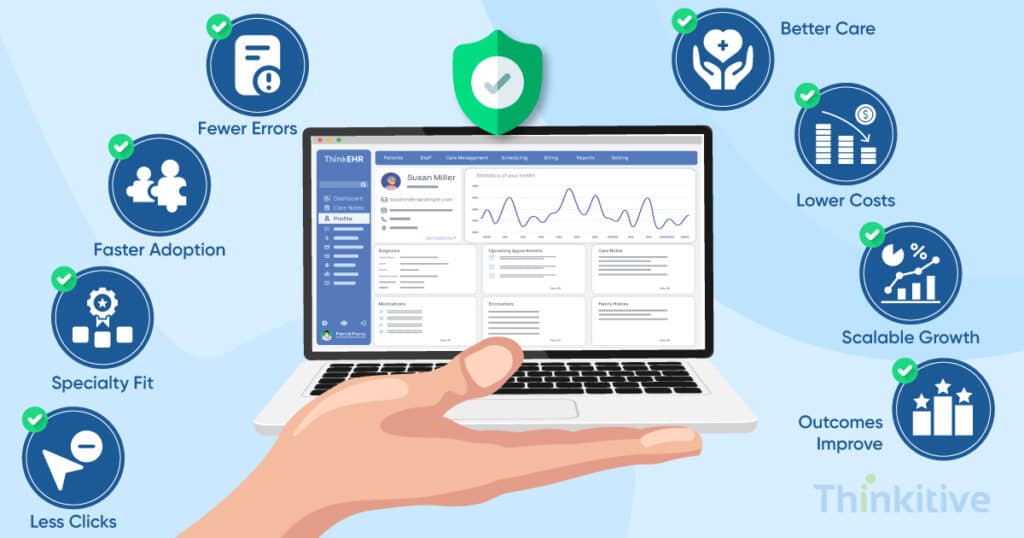
The outlook of healthcare practices is changing. You see, when you enter a hospital or a clinic, instead of the patients, the providers seem to be more frustrated. Do you agree?
This observation of mine brought me to the internet to search for backing for my claims. Now, the interesting part is that the internet is filled with extraordinary stats that I could pick to back my observation. However, finding a reliable one in the pool of abundance, a Jama Network study showed that only 25% of the family physicians are satisfied, while the other 75% are either very dissatisfied or somewhat satisfied.
Some studies even suggested that in 2022, a survey of the VA Medical Center showed that 92.5% of staff directly blamed EHRs for inefficient work, increased documentation time, and the list goes on. And at Thinkitive, while speaking with prominent healthcare providers around the world, this seems to be a persistent problem, which has become one of the reasons for the increasing adoption of custom EHR software development.
But why does the solution to an EHR problem lie with another EHR?
Well, if you think a little logically, then every practice is different and works in a fashion that is unique to that facility. That is the reason why your EHR should be aligned with your practice, not the other way around, with the ability for EHR workflow customization.
Having said that, let’s see why your EHR should be specific to your workflows and your EHR clinical workflows needs. So, without wasting any more of your time, let’s deep dive.
Assess Your EHR System for AI Compatibility & Readiness
Take AssessmentWhy One Size Doesn’t Fit All: The Hidden Costs of Generic EHR Systems
Well, to answer this question in one line, then it is already answered in the introduction section. But let’s understand this in the context of an example here.
- Productivity Loss
Let’s assume that instead of a generic healthcare practice, you have a specialty practice, catering to healthcare services. Now, depending on the specialty and care delivery processes, you decide on the documentation and other aspects, right? Well, typically in an off-the-shelf or generic EHR, that option is not available. Rather, you are fixed to one particular process, which might disrupt everything. Also, the documentation increases, taking up to 2 hours for accuracy.
- Clinical Workflow Disruption
Suppose, your practice is a cardiology practice, and the generic EHR you’re using is curated with respect to that of a generic clinic. This not only creates safety risks, but also leads to fatigue for providers who are using these systems on a day to day basis. This not only creates gaps in communication but also increases the chances of data entry errors across departments.
- Staff Burnout & Turnover
If you’ve been thoroughly reading this article, then it is not hard to figure out that EHR frustration is one of the leading causes of physical burnouts. The pyjama time these healthcare providers have been giving to the documentation process is slowly creating dissatisfaction. And these factors impact recruitment and retention rate.
- Patient Care Compromise
Care journey for a patient is about experience, and unaligned workflows compromises that with reduced face-to-face consultation time and delayed treatment, etc. This drastically impacts your care delivery process and creates enormous dissatisfaction levels.
If you’ve made it till here, then you know that the cost of EHR development crucially depends on various factors, right? So, here is the complete cost breakdown of you in our blog – Custom EMR Development: Complete Cost Breakdown.
Specialty-Specific Workflow Requirements: From Cardiology to Pediatrics
In this blog, you have been repeatedly told that every practice has unique and specific workflows, right? Well, some of you might ask, what exactly do I mean by it? So what I mean by that is that the care procedure and the patient’s care journey flow in a specific way, or rather in a particular way that is unique to the practice at times. That is why you see there are healthcare institutions wanting to have a separate software for their practices. In this, we’ll discuss some of the prominent practices and what specific workflows are needed.
| Specialty | Workflow Needs | Custom EHR Focus |
| Cardiology | – ECG integration & automated interpretation- Cardiac catheterization documentation- Risk score calculations (TIMI, GRACE)- Pacemaker & ICD device management tracking | – Seamless device & diagnostic tool integration- Decision-support tools for cardiac risk stratification- Longitudinal device tracking dashboards- Structured templates for cardiology-specific procedures |
| Pediatrics | – Weight-based dosing calculations- Growth chart integration- Vaccination schedule tracking- Parent/guardian communication tools | – Pediatric dosing calculators embedded in prescribing- Growth trend visualization tools- Automated vaccination reminders & compliance tracking- Secure communication portals for families |
| Mental Health | – Session note templates- Treatment plan tracking- Medication management with mood tracking- Integrated screening tools (PHQ-9, GAD-7) | – Specialty note templates for psychotherapy & psychiatry- Progress tracking dashboards for therapy plans- Medication adherence + mood correlation tools- Built-in mental health assessments & scoring |
| Surgical Specialties | – Pre-op/post-op workflow automation- OR scheduling integration- Surgical consent management- Complications tracking & reporting | – Workflow-driven surgical checklists- OR resource & scheduling integration- Digital consent forms & compliance logging- Outcome reporting & complication dashboards |
| Dermatology | – Lesion/mole image capture & comparison- Biopsy order & pathology tracking- Treatment documentation for chronic skin conditions- Cosmetic & laser procedure workflows | – Image management tools with before/after comparison- Integrated pathology reporting- Templates for dermatology-specific diagnoses & follow-ups- Cosmetic procedure documentation & billing support |
Though these are some of the specific clinical workflow needs and their customization required in that a customizable EHR, the administrative is a complete workflow altogether. Having said that, such are the intricacies of a custom EHR software.
Clinical Decision Support Built on EHR Workflow Customization
While the majority of the people using EHRs will be for consultations, here are some of the features in a custom EHR that you can have as clinical decision support.
[Make note: These features are highly encountered during care planning and clinical use, and at times, they can have a direct impact on your administrative side as well.]
- Customized Alert System: This feature again consists of developing an entire system with features such as role-based alert filtering, severity-based patient prioritization, context-based notification and the most important part, a learning algorithm which continuously learns from itself. This will ensure that every important reading, or development about the patient’s health reaches you at the right time so that the right care can be provided.
- Integrated Clinical Pathways: The clinical pathway for every practice is different on a micro level, but the same on the macro level. You see, you will need to develop condition-specific workflows for specialties you serve and automated task-assignment for your staff. Even a progress tracking dashboard and deviation alert system can be initiated with evidence-based recommendations for clarity.
- Predictive Analytics Integration: Including this feature can be like building a complete virtual care ecosystem and turning your care approach from reactive to proactive. Some of the essential features are risk stratification models, readmission prediction models, resource utilisation forecasting, and population health management tools.
Workflow Optimization Through Intelligent Automation
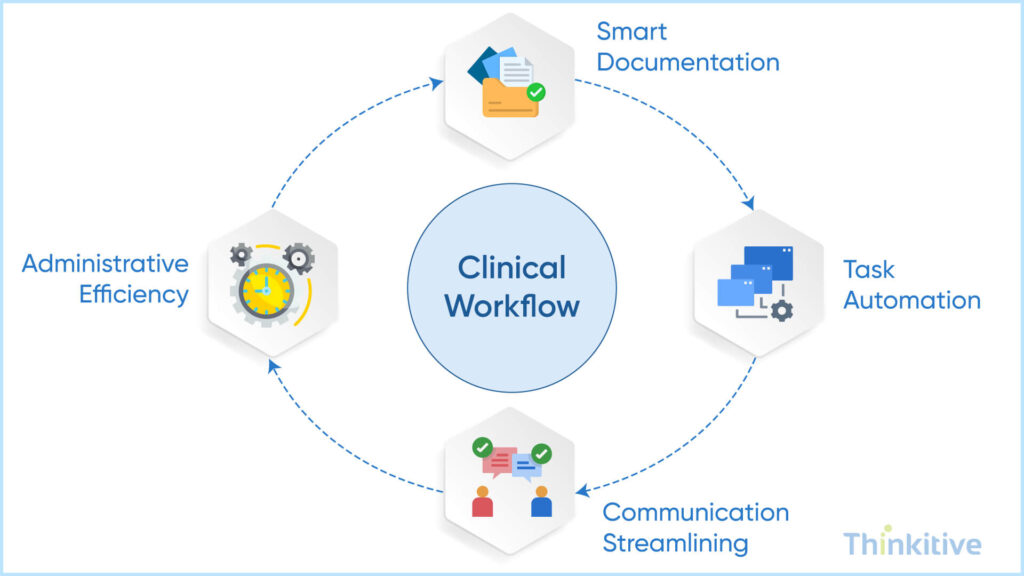
Now, after telling you about the administrative part, it would be really unfair not to at least touch on some parts of it. So, workflow optimization means automating certain aspects or procedures to make doing that particular task easier. While achieving this in healthcare seems too much, if you find the proactive ways of using it in your customizable EHR, then it can do wonders.
Let’s see some with examples:
- Smart Documentation Features: Let’s see you are a dermatology practice and you need to document something about the condition of the patient during consultation. In such a context, voice-to-text with medical vocabulary can be extremely useful and coupling that with AI-assisted contextual auto-complete programs can ease out a lot of documentation efforts by auto completing the documentation processes based on the clinical context. Furthermore, with AI-driven template learning features your clinicians can be relieved at least for documentation. For instance, this feature makes your template smarter and it learns from its continuous use and the patterns that particular clinician follows. Meaning, next time they want to document, the template will automatically suggest things based on the data it will get.
- Task Automation: Automatic routing of lab results to the respective EHRs won’t keep the administrator waiting during the billing aspect. Or the prescription renewal workflows won’t keep the pharmacist empty. The insurance verification process can also be automated with insurance verification automation to speed up the onboarding process.
- Communication Streamlining: Given your development in this direction of development, streamlining communication plays a crucial role. In these features like role-based messaging, automated handoff summaries can be crucial for provider-patient communication. Furthermore, with integrated team collaboration and patient portal automation, certain aspects of communication between your practice and patients can be automated.
- Administrative Efficiency: The features that can bring efficiency to your administrative processes specifically are the billing code suggestions system for billing processes, or an automated prior authorization mechanism during the onboarding or on specific care episodes. Even the quality reporting automation to ensure care provided is quality and not compromised, and compliance documentation to ensure ethical practice of software systems during care delivery to protect you from necessary compliance.
Calculate the ROI of Automating Your Clinical & Administrative Workflows
Calculate ROIMeasuring Success: KPIs for Workflow-Aligned EHR Systems
You might go ahead with custom EHR software development, but the question that you must ask yourself is how will a system aligned with my workflow improve the clinical and administrative aspects of my practice right?
Well, here are some of the pointers that will help you measure the success of your custom EHR software.
- Efficiency Metrics
The claim that not just us, but any custom EHR development company would make is that the software will improve your efficiency. Here is how you can measure it. Increase in documentation time per patient. Reduced the number of clicks, the time taken by the provider to complete a particular task, and the system navigation time per user.
If you see improvement in this, then understand that the software project is a success.
- Clinical Quality Indicators
If you have been reading this blog closely, then you must have read about improving your care delivery quality using a customizable EHR. Here is how you can measure the clinical quality indicators, for instance with care gap closure rates, protocol adherence scores to ensure standard procedure is followed and error reduction statistics and decrease in patient safety metrics. An improvement in these scores can ensure that the custom EHR software ventures have indeed improved the quality of care delivery.
- User Satisfaction Measurements
While this can be conducted manually, since your system can also assess itself, an increase in the physician satisfaction score would mean they are comfortable using it. The same goes with nurses and how much time the staff is spending on it can also be metric.
- Financial Impact Analysis
Since we have been talking about customizable EHR improving the administrative aspects, let’s see how:
Since the installation of your own EHR software, if you observe that your practice’s revenue cycle has improved due to coding accuracy then it’s indeed an improvement. Other ways that can also indicate its success are reduction in denial rates.
Implementation Roadmap: From Current State to Optimized Workflows
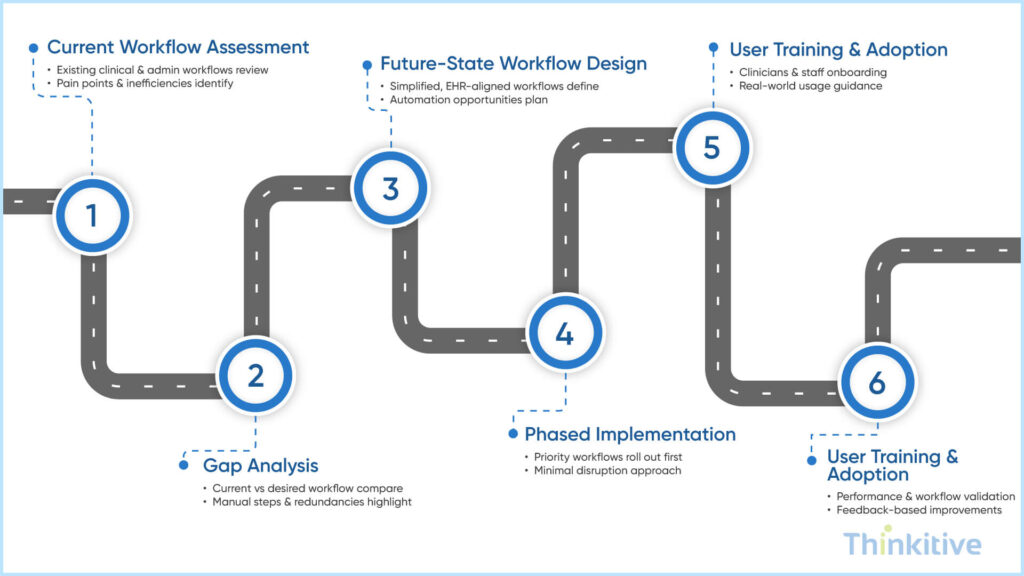
You can plan all you want, but when it comes to implementation, the benefits of specialty specific EHR workflows can be lost, if the system is not implemented correctly. There are various hurdles can comes, but if you have a roadmap for implementation then you can easily optimize your current EHR system’s workflow to that of your practice:
- Workflow Assessment Phase: The first thing you need for enhancing your workflow is assessing the current workflow for documentation. This is crucial because it will bring forward the pain points that are making the documentation process inefficient. After this, discuss this with all the stakeholders such as physicians, staff members, administrators, etc., so that no stone is left unturned. Furthermore, while you’re addressing the workflows, check its relevance for the future as well, as the landscape is constantly changing.
- Design & Customization: After workflow, if something is to disrupt the workflows is design and customization aspects. The best way to design your custom EHR workflows is to have collaborative designing sessions with all the stakeholders and developers. Only when the developers understand the workflows, can they map points and make it a fully optimized workflow, suitable for clinical and administrative activities. Also, before finalizing any design, create prototypes and test them so that it is also usable. Then conduct user testing so that, when the software is finally released it can be usable for everyone. Last but not least, do iterative refinements in the design even after deployment so that it becomes easier to use with time.
- Phased Implementation Strategy: One of the best ways for proper implementation of EHR workflow design is by phased implementation strategy. First develop an MVP product and then add the features that you need to them, this way normal processes are made better. Also, it is better to have a change management plan so that effective transition is ensured and develop training programs with respect to that.
- Continuous Optimization: If you’ve done clinical workflow optimization for your EHR design, then it’s not the final. You see, as time passes, technology and healthcare will change. To adapt to these changes, you need many continuous updates into the workflows. Use analytics to identify gaps, along with regular feedback from the users, so that you understand the problems from the ground up. Also, set a workflow refinement cycle so that the workflows are updated on a regular basis and it also sets the base for adding new features whenever necessary.
Step-by-Step Custom EHR Development Roadmap Guide
Download GuideConclusion
If you have been reading this blog carefully, which I hope you did, then I think I might have convinced you with enough evidence or let’s say how a custom EHR software development can transform your practice by being specific to your practice.
Also, if you’re in a transition stage then considering as a short-term investment turn long can be a win-win situation for everyone. Having said that, the major reason for why you should switch to a custom EHR is to save time, reduce burnout and ensure better patient care delivery.
On that note, let’s see how a customizable EHR would look in your practice. Click here to get your free assessment.
Frequently Asked Questions
A generic EHR is built for the “average” healthcare organization. It forces clinicians to adapt their clinical processes to predefined screens, fields, and navigation paths—often resulting in workarounds and inefficiencies.
In contrast, custom EHR workflows are designed around how care is actually delivered in your organization. With EHR workflow customization, documentation flows, order sets, and clinical actions follow real-world steps instead of rigid templates. This makes EHR clinical workflows more intuitive, faster to use, and far more relevant to each role and specialty.
Burnout often comes from cognitive overload—not just long hours. Poorly designed systems increase clicks, force redundant data entry, and interrupt clinical thinking.
By reducing physician burnout through custom EHR workflows, clinicians spend less time navigating software and more time practicing medicine. Clinical workflow optimization removes unnecessary steps, auto-populates data, and aligns screens with decision-making moments. The result is less frustration, fewer after-hours charting sessions, and improved job satisfaction.
To truly understand how to align EHR design with clinical processes, organizations must start before a single line of code is written:
- Clinical workflow mapping of current-state processes
- Identification of inefficiencies, handoff delays, and data gaps
- Collaboration with physicians, nurses, and admin staff
- Designing role-based EHR workflow design prototypes
- Iterative testing with real clinical scenarios
This approach ensures the technology adapts to care delivery—not the other way around.
Absolutely. The benefits of specialty specific EHR workflows go far beyond convenience.When EHR clinical workflows are tailored to a specialty, required data fields, alerts, and clinical checks appear at the right time. This reduces missed documentation, prevents incomplete orders, and improves clinical decision-making. Structured, relevant workflows also lead to more accurate data capture, which directly impacts patient safety, reporting, and compliance.
While custom solutions may have higher upfront costs, custom EHR workflows significantly improve long-term ROI. Faster documentation, reduced errors, fewer support tickets, and improved clinician retention all contribute to measurable savings.
Effective EHR workflow customization also increases throughput, improves billing accuracy, and reduces dependence on costly third-party add-ons. Over time, clinical workflow optimization turns the EHR from a cost center into a performance driver.
Workflow mapping provides clarity. Without it, development teams risk digitizing inefficiencies instead of eliminating them.
By mapping workflows first, organizations define what success looks like for EHR workflow design. This step ensures that custom EHR workflows reflect real clinical priorities, reduce unnecessary steps, and support future scalability. It also minimizes rework, scope creep, and clinician dissatisfaction post-launch.
Every extra click represents friction. Clinical workflow optimization streamlines navigation by grouping related actions, automating repetitive entries, and eliminating irrelevant screens.
Through thoughtful EHR workflow customization, doctors can complete common tasks—like charting, ordering, and reviewing results—in fewer steps. Optimized EHR clinical workflows reduce interaction time with the system, allowing clinicians to stay focused on patient care instead of software mechanics.


