EHR Data Migration: Complete Guide to Switching from Legacy Systems

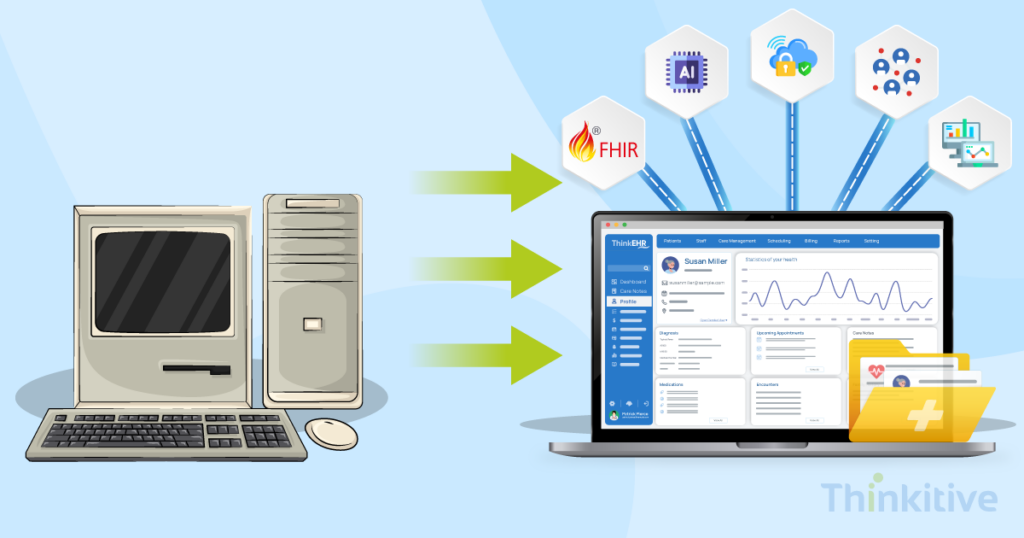
Today’s EHR system demands have evolved over the last few years, and a report by the CDC suggested that 95% of hospitals have adopted EHR systems. In fact, the entire healthcare industry has spent over the last decade to reach here.
However, looking at the current landscape of the healthcare industry, the needs are quite unique and advanced in nature. You see, practices are demanding interoperability, cloud infrastructure, AI-driven workflows, and adherence to evolving regulatory requirements.
Due to this, many practices are looking for custom EHR development to upgrade their system and give their practice an EHR system that it actually wants. The main problem here is the large adoption rate of legacy systems, which are incapable of meeting the current-day needs, leaving practices with only the option to go for custom EHR development.
During this development process, EHR data migration is one of the most important aspects. It refers to transferring patient records from one database to another. In this phase, maintaining data integrity, compliance, mapping complex clinical information, validating migrated records, and minimizing disruption are some of the most important yet challenging things.
This is where a well-defined legacy EHR migration and EHR data conversion strategy comes into play. It helps in mitigating data loss, workflow interruptions, compliance issues, and reducing user adoption.
On that note, in this blog, let’s explore the intricacies of Electronic Health Record migration and give me a comprehensive roadmap for how to migrate from a legacy EHR system. And while we are at it, let’s also try to answer one of your most common questions: ‘How to switch from a legacy EHR to a modern EHR?’
So, without further ado, let’s get started!
Let’s Decide the Ideal EHR Data Migration Strategy for You –
Get Free Consultation
Key Takeaways
- EHR data migration transfers clinical, administrative, financial, and patient data from a legacy system to a modern EHR while maintaining data integrity, security, and regulatory compliance.
- A successful migration starts with assessing legacy systems, defining the migration scope, and choosing the right migration strategy.
- Data cleansing, conversion, mapping, validation, and testing are essential to minimize migration risks and ensure accurate patient records.
- The right migration approach—Big Bang, Phased, Parallel, or Hybrid—depends on your organization’s size, operational needs, and acceptable downtime.
- Post-migration monitoring and continuous optimization help improve clinical workflows, maintain data quality, and maximize the long-term value of your new EHR.
Understanding EHR Data Migration
EHR data migration is a complicated process and involves a lot of different things. But the most often interchangeable terms in this process are data conversion, data archiving, and data migration.
Interestingly, they all serve a different purpose, and that’s why understanding the entire EHR data migration is necessary. It will not only help you make informed decisions but also help you choose the right EHR data migration strategy for your clinical, operational, and compliance needs.
In simple words, EHR data migration is the process through which healthcare practices can retain their patient and operational data during legacy health system modernization.
Coming to the interchangeable terms often used, here is a quick table to help you understand the difference better:
| Aspect | EHR Data Migration | EHR Data Conversion | Data Archiving |
| Purpose | Move data to a new EHR | Transform data into compatible formats | Preserve historical records |
| Data Destination | New EHR | Existing or new EHR | Archive repository |
| Includes Mapping | ✓ | ✓ | ✗ |
| Active Use | Yes | Yes | No |
| Typical Use Case | Replacing legacy systems | Standardizing incompatible data | Regulatory retention |
Why Healthcare Organizations Migrate from Legacy Systems
There are several reasons why you should migrate from legacy systems. Let’s try to pen them down.
First things first, using legacy systems in this modern ecosystem will lead to operational challenges. Some of the most common operational challenges are:
- Slow clinical workflows
- Manual documentation
- Limited scalability
- High maintenance costs
Other than the operational challenges, you need to understand that legacy systems are built using legacy systems. These technologies limit your scope in certain aspects like:
- Poor interoperability
- Lack of FHIR APIs
- Legacy infrastructure
- Limited cloud support
But these are just the challenges and limitations of legacy systems. Let’s have a look at why your business and clinical needs make EHR data migration the ideal choice:
- AI-powered documentation
- Population health
- Better analytics
- Better patient engagement
- Easier regulatory reporting
As healthcare delivery continues to evolve, maintaining outdated systems often becomes more expensive—and more limiting—than modernizing them.
Other than that, successful EHR data migration would help you improve clinical efficiency with faster access to patient records, better care coordination, and reduced duplicate documentation.
It also offers better interoperability, helps ensure higher data quality in the system, and equips your system with future-ready healthcare infrastructure. However, remember that a successful migration depends on careful planning, data preparation, testing, and execution.
How Do You Plan a Successful EHR Data Migration?
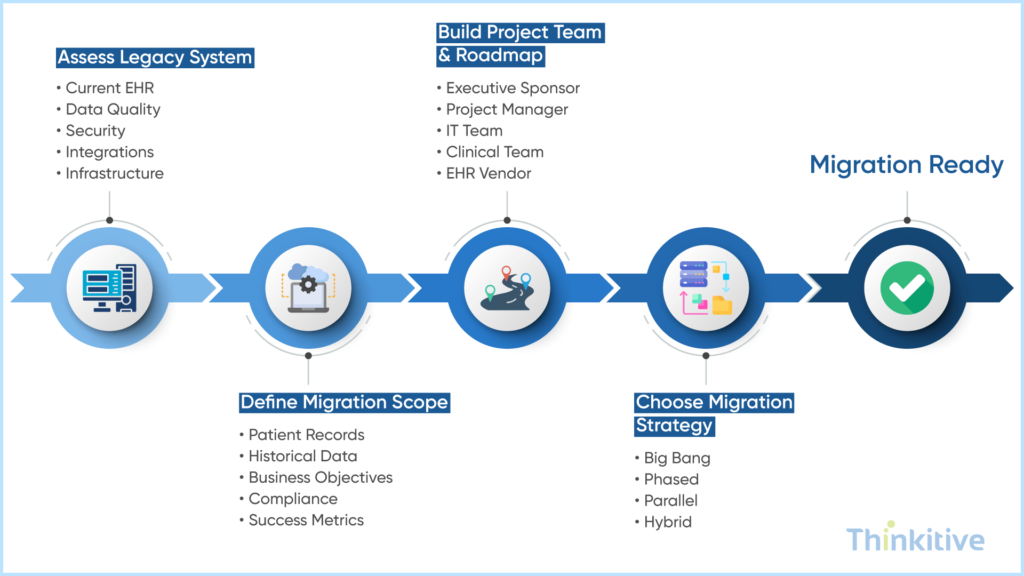
Before you start transferring your data records from one system to another, there are certain things that you need to do. You see, the data migration process does not start with transferring data but by identifying the data that needs to be migrated, defining clear business objectives, and establishing a realistic migration plan.
That is why planning for your EHR data migration can help you reduce risks, prevent costly delays, and ensure a smoother transition to the new EHR platform.
Assess Legacy Systems & Migration Readiness
Before migrating data, the very first thing that you need to do is to evaluate your current EHR environment to identify technical limitations, data quality issues, and organizational readiness. A thorough assessment needs to be done to uncover risks early and ensure the migration plan is based on accurate data.
Here is what you need to evaluate:
- Current EHR architecture and database
- Third-party integrations and customizations
- Data quality (duplicates, incomplete or outdated records)
- Infrastructure and security readiness
- Interoperability capabilities (HL7, FHIR, APIs)
- Internal resources, budget, and timeline
Define Migration Scope & Project Objectives
You need to understand that not every piece of data needs to be migrated to the new system; you might never actually use it. Having said that, that is why you clearly define the migration scope to reduce complexity, lower costs, and focus on data that supports ongoing patient care and business operations.
Here is what you should be determined to do in this:
- Which patient records will be migrated?
- Historical data to archive
- Clinical, financial, and administrative data requirements
- Compliance and retention requirements
- Success metrics and business objectives
Build the Migration Roadmap & Project Team
EHR migration requires collaboration across technical, clinical, and administrative teams. From assigning clear roles to creating a phased roadmap are all aspects of this that keep the project on schedule.
This stage includes:
- Executive sponsor
- Project manager
- IT and infrastructure team
- Clinical stakeholders
- Compliance and security team
- EHR vendor or implementation partner
Choose the Right Migration Strategy
The best migration strategy for your practice is defined by your practice’s size, operational needs, and acceptable downtime. Here are the four strategies that might be perfectly suitable for your venture:
- Big Bang Migration: Move all data at once. Faster but carries higher risk.
- Phased Migration: Migrate modules or departments in stages. Lower risk with a longer implementation timeline.
- Parallel Migration: Run both systems simultaneously until the new EHR is fully validated. Offers a safer transition but increases operational complexity.
- Hybrid Migration: Combines multiple strategies to accommodate large or complex healthcare organizations.
Let’s Determine the Scope of Your Custom EHR Software –
Book Free DemoCore Phases of EHR Data Migration
Once you have finalized the EHR data migration strategy, the project finally moves into the execution phase. While the exact workflows vary depending on your practice and EHR platform, they follow certain tried and tested activities that ensure successful migration.
On that note, here are some of the core phases of EHR data migration that you can adopt for your project as EHR data migration best practices:
1. Extract & Assess Legacy Data: Export data from the legacy EHR, identify duplicate or obsolete records, verify completeness, and create secure backups before migration.
2. Data Conversion & Mapping: Convert legacy data into compatible formats, map fields to the new EHR, and standardize clinical terminologies such as ICD, SNOMED CT, and LOINC.
3. Validation & Testing: Validate migrated records, perform integration and workflow testing, complete user acceptance testing (UAT), and verify system performance before go-live.
4. Migration Execution: Schedule the production cutover, freeze legacy data, execute the migration, maintain rollback plans, and monitor critical clinical workflows.
5. Post-Migration Monitoring: Resolve migration issues, monitor integrations, collect user feedback, optimize workflows, and continuously improve system performance.
Although these phases are presented sequentially, EHR data migration is often iterative. Healthcare organizations may revisit data mapping, validation, or testing multiple times before go-live to ensure the migration meets clinical, operational, and regulatory requirements.
During the entire migration process, security of the EHR system as a whole is not addressed properly. From adherence to necessary compliances like FHIR, SOC2, etc., to implementing zero trust architecture, everything related to security must be treated with priority. Here is our detailed blog for your better understanding – Custom EHR Security: HIPAA, SOC2 & Zero Trust Architecture Guide.
Common Challenges During Legacy EHR Migration
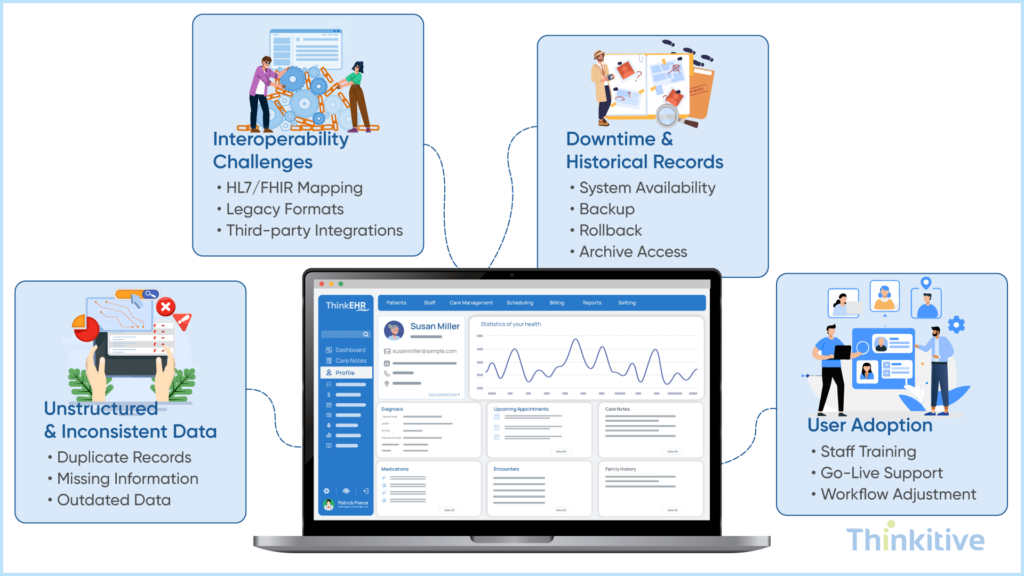
Migrating from a legacy EHR system is more than just transferring data from one platform to another. And in this quest, you will encounter technical, operational, and usability-related challenges that can impact the success of your EHR data migration project.
Here are some of the most common obstacles that can help you prepare effective mitigation strategies and reduce risks throughout the project:
Managing Unstructured & Inconsistent Legacy Data
Legacy EHR systems contain duplicate records, incomplete patient information, outdated data, and inconsistent coding standards. Migrating poor-quality data into a new system can create long-term operational and clinical issues. Some of the best practices to overcome this are:
- Identify and remove duplicate records.
- Clean and standardize clinical data.
- Validate mandatory patient information.
- Archive obsolete or inactive records instead of migrating them.
Addressing Interoperability Between Legacy & Modern Systems
Older EHR systems may rely on proprietary formats or outdated integration methods. This makes it difficult to exchange data with modern healthcare applications. Some of the things you can do to improve interoperability are:
- Adopt healthcare standards such as HL7 and FHIR.
- Map legacy data to standardized formats.
- Test integrations with third-party systems.
- Validate data exchange before go-live.
Note: Over the years, building FHIR-native custom EHR software has been an effective way of addressing the concern of interoperability. We have prepared a detailed article on how to build a FHIR-native custom EHR, for your better understanding about this architecture
Reducing Downtime While Preserving Historical Clinical Records
Extended downtime can interrupt clinical workflows and delay patient care. At the same time, healthcare providers need access to historical records during and after migration. Recommended approaches includes:
- Schedule migration during off-peak hours.
- Perform complete system backups before migration.
- Maintain a rollback plan for unexpected issues.
- Archive historical records while migrating active patient data.
Supporting User Adoption After Migration
Even a technically successful migration can fail if clinicians and staff struggle to use the new system effectively. User adoption is critical for realizing the full benefits of a modern EHR.
Here are a few things that you can do to:
- Provide role-based training before go-live.
- Offer on-site support during the transition.
- Gather user feedback and address workflow issues.
- Continuously optimize workflows based on real-world usage.
Watch Custom EHR in Action For Your Practice –
Watch Free DemoPost Migration Optimization
Migrating to a new EHR is only the first step. Continuous optimization ensures the system delivers long-term value while adapting to evolving clinical and operational requirements.
To maximize the benefits of your new EHR:
- Improve documentation consistency by implementing clinical documentation automation and standardized templates.
- Monitor data quality and system performance through regular audits, integration checks, security monitoring, and user feedback.
- Optimize clinical workflows by identifying bottlenecks, refining processes, and providing ongoing training to clinicians and staff.
- Plan future modernization initiatives such as expanding FHIR interoperability, adopting AI-powered capabilities, strengthening cybersecurity, and enhancing patient engagement.
A proactive optimization strategy helps healthcare organizations improve clinician productivity, maintain data integrity, and ensure their EHR remains scalable, compliant, and future-ready.
However, post-migration optimization can be a challenging venture for multi-speciality practices operating at different locations. Addressing that concern particularly, we have an in-depth article about its architecture and things you should consider. On that note, read out blog – Building Multi-Specialty EHR: Architecture for Group Practices.
Conclusion
If you have been trying to switch to a completely new EHR system, then EHR data migration is something that you must not ignore. It not only allows your data to be complete but also sets the stage for the future innovation of the healthcare industry as well as your EHR system.
On that note, let this blog be your guide to switching from a legacy EHR system to a custom EHR system and help you in minimizing risk and protecting your patient data.
So, what are you waiting for? Assess your system for EHR data migration with our EHR expert and start your EHR data migration project with an experienced EHR software development company.
Frequently Asked Questions
EHR Data Migration is the process of transferring clinical, administrative, financial, and patient data from one electronic health record (EHR) system to another. A successful migration preserves data integrity, maintains regulatory compliance, minimizes downtime, and ensures healthcare providers can continue delivering quality patient care without disruption.
While often used interchangeably, EHR Data Migration and EHR Data Conversion serve different purposes. EHR data migration focuses on moving data from a legacy system to a new EHR platform, whereas EHR data conversion transforms data into compatible formats, structures, or standards so it can be accurately used within the new system. Most healthcare data migration projects include both migration and data conversion.
Healthcare organizations pursue Legacy EHR Migration to overcome the limitations of outdated systems. Common reasons include improving interoperability, adopting cloud-based infrastructure, enabling AI-powered workflows, reducing maintenance costs, meeting evolving regulatory requirements, and supporting Legacy Health System Modernization initiatives that improve clinical and operational efficiency.
If you’re wondering how to migrate from a legacy EHR system, the process typically begins with assessing the existing system, defining the migration scope, cleansing and mapping data, performing EHR Data Conversion, validating migrated records, executing the migration with minimal downtime, and continuously monitoring system performance after go-live. Careful planning and testing are essential for a successful transition.
Some of the most common challenges during Legacy EHR Migration include poor data quality, inconsistent legacy records, complex data mapping, interoperability issues, system downtime, preserving historical clinical information, maintaining regulatory compliance, and ensuring clinicians quickly adapt to the new EHR. Addressing these challenges early helps reduce project risks and improve migration outcomes.
Some of the most effective EHR data migration best practices include conducting a comprehensive readiness assessment, cleaning and standardizing legacy data, defining a clear migration strategy, validating mapped data before go-live, maintaining secure backups, performing thorough testing, involving clinical stakeholders throughout the project, and monitoring system performance after migration.
The timeline for an Electronic Health Record Migration depends on factors such as the size of the organization, data volume, system complexity, number of integrations, and migration strategy. Smaller practices may complete migration within a few weeks, while large hospitals and healthcare networks may require several months to ensure accurate data transfer, testing, validation, and user training.
Clinical Documentation Automation helps healthcare organizations improve documentation consistency, reduce manual data entry, and minimize clinician burnout after migration. Automated documentation also enhances coding accuracy, supports regulatory compliance, and allows clinicians to spend more time delivering patient care instead of completing administrative tasks.
After Healthcare Data Migration, organizations should validate patient demographics, medication lists, allergies, clinical notes, laboratory results, billing information, and user permissions. In addition to automated validation, clinical teams should perform user acceptance testing and workflow verification to confirm that the migrated data is accurate, complete, and ready for everyday clinical use.


