How to Build EHR with Voice-to-Text Clinical Notes

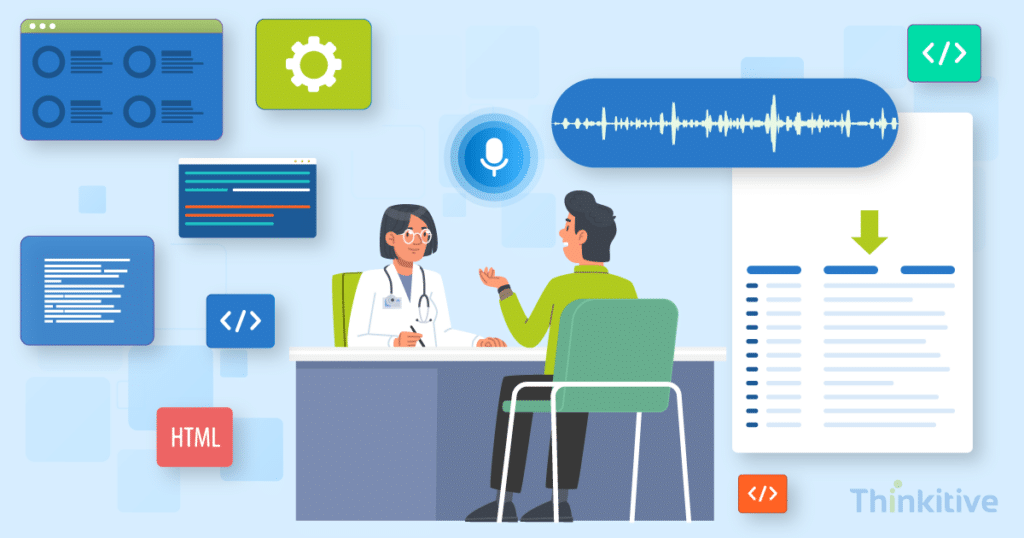
Documentation has become a huge problem for many healthcare practices, and it is consuming a significant amount of providers’ time.
You see, according to a study by UCLA Health, for every 1 hour a clinician spends with a patient, they spend almost 2 hours on their EHR and documentation tasks. Due to these complex processes, clinical documentation has become one of the biggest contributors to administrative burden and physician burnout.
Realizing this time wasted on documentation and to bring the focus on healthcare providers back on patient care, many practices have started to build EHR voice-to-text systems.
With these medical speech recognition systems sitting in your EHR, it silently listens to your conversations and converts it into structured clinical documentation. Furthermore, voice-enabled workflows also help clinicians capture information faster, reduce manual typing, and streamline documentation without interrupting anything related to patient interactions.
The most interesting part of this is that recent clinical research even supports this shift. A randomized trial involving 238 physicians across 14 specialties shows that building an EHR with an AI scribe can reduce documentation time by nearly 9.5% compared to conventional workflows.
However, the question that you might get here is ‘How to develop EHR with voice-to-text capabilities?’
Well, building voice-to-text functionality into an EHR will involve more than just connecting a speech recognition API. It will require real-time audio streaming, medical speech recognition, natural language processing (NLP), AI-powered note generation, clinical validation, secure data handling, and seamless integration with existing EHR workflows.
On that note, in this blog, let’s try to find an answer to your question and see how to build EHR voice-to-text functionality and how it will help you in providing a secure, scalable, and clinician-friendly documentation experience.
So, without further ado, let’s get started!
Assess Your Existing EHR System for Voice-to-Text Capabilities –
Get Free Assessment
Understanding Voice-to-Text Clinical Documentation in EHR
Voice-to-text clinical notes allow healthcare providers to create clinical notes by speaking instead of typing. This is done by using medical speech recognition, where the system converts spoken words into text and stores them directly in the EHR.
By leveraging advanced technologies, such as AI and NLP, healthcare providers can enhance this process accurately by training the system to recognize medical terminology and organize information into structured notes, and reduce manual editing.
Unlike traditional dictation or voice-to-text systems, these systems generate notes in real time, and the AI-assisted documentation can further summarize conversations and structure them into the desired format.
Here is a quick table to help you understand the differences clearly:
| Feature | Traditional Dictation | Voice-to-Text | AI-Assisted Documentation |
| Process | Audio recorded for later transcription | Speech converted into text in real time | AI generates structured clinical notes from speech |
| Documentation | Manual transcription | Instant transcription | Structured SOAP notes, summaries, and clinical insights |
| Provider Effort | High | Moderate | Low |
If you are integrating voice-to-text capabilities into your EHR, then it will be more than just a documentation system. It will improve your clinical workflows and enhance provider productivity in the following ways:
- Reducing manual typing and documentation effort.
- Accelerating clinical note completion.
- Improving documentation consistency and accuracy.
- Supporting coding, billing, and compliance workflows.
- Giving providers more time to focus on patient care.
In this way, you can improve your clinical efficiency by giving your providers the time they deserve with their patients and not compromise on the documentation quality.
Core Components Required to Build Voice-to-Text Features in an EHR
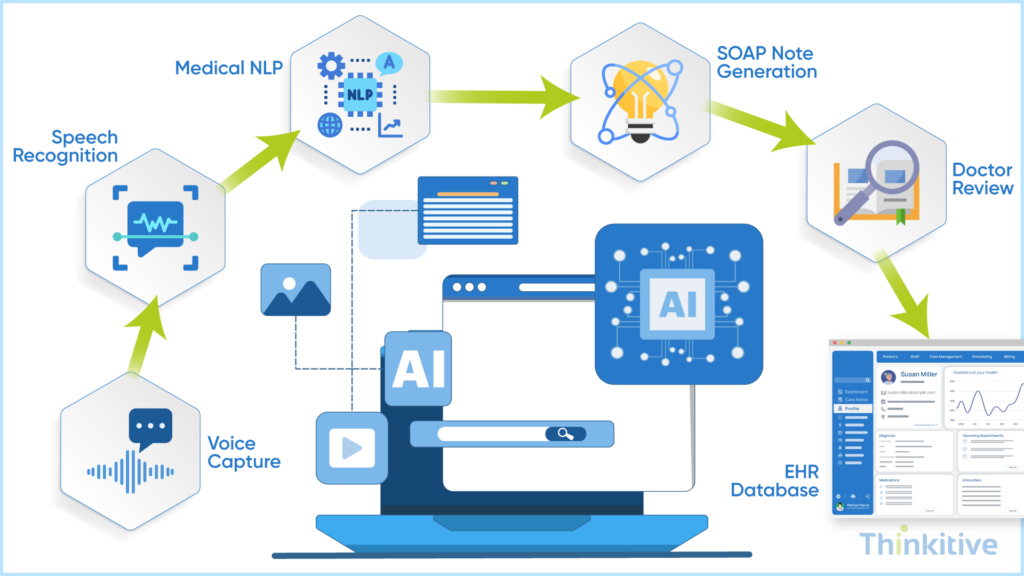
As discussed earlier, building a voice-to-text EHR is more than just integrating a speech recognition API. In fact, it is a combination of multiple technologies that work together to capture, process, validate, and securely store clinical documentation.
On that note, here are the core components that you require to build voice-to-text features in EHR:
- Audio Capture & Voice Input: At the center of this feature is your system’s capability to support secure audio capture from desktops, tablets, or mobile devices to ensure high-quality voice input with minimal background noise.
- Medical Speech Recognition Engine: Look at this like a modern speech recognition system, which accurately recognizes clinical terminology, drug names, abbreviation and specialty-specific language to improve transcription accuracy. Medical speech recognition engines are typically more suitable and advanced than generic speech recognition systems.
- Clinical Language Processing: Natural Language Processing (NLP) analyzes the transcribed text, identifies clinical entities, and understands the context of diagnoses, mediations, procedures, and patient history to accurately capture your conversations.
- Structured Clinical Note Generation: You will also need an AI system that can organize the captured information into the documentation format you prefer. It can help you with the generation of SOAP notes, progress notes, consultation notes, or discharge summaries so that they are easily reviewed and fed into the EHR system.
- Provider Review & Editing: AI can still make mistakes, and that is why, before finalizing documentation, you must involve the providers in the loop to review, edit, approve, or reject the generated notes. This way, accuracy of the system can be ensured, and you also adhere to the necessary compliance requirements.
- Secure Storage & EHR Synchronization: Once the notes are generated and approved by the provider, it must be stored securely within the EHR system, synchronized across clinical modules, and made available for billing, coding, clinical decision support, and interoperability through standards like FHIR.
Build Your Own EHR With AI Scribe Capabilities –
Read GuideChoosing the Right Speech-to-Text Technology for Healthcare
Before selecting the right speech recognition engine for speech-to-text technology, you must evaluate how the solution understands medical terminology, supports clinical workflows, generates structured documentation, integrates with existing EHR systems, and addresses scalability aspects.
Typically, the ideal choice purely depends on your goals. For instance, some practices require accurate medical transition, while others may need AI-assisted documentation with structured note generation with automated workflows.
Here a quick comparison table that highlights the key differences to help you choose the right technology that suits your needs best to build EHR voice-to-text:
| Evaluation Criteria | Generic Speech Engine | Medical Speech Engine | AI Scribe Platform |
| Medical Vocabulary Accuracy | Moderate; struggles with clinical terms | High; trained on medical terminology | Very High; understands medical context and terminology |
| Clinical Context Understanding | Limited | Moderate | Advanced |
| Real-Time Transcription | ✓ Yes | ✓ Yes | ✓ Yes |
| Structured Note Generation | ✗ No | Limited | ✓ Yes |
| Customization | Basic settings | Specialty-specific vocabularies and templates | Extensive workflow and specialty customization |
| Implementation Complexity | Low | Moderate | High |
| Cost | Low | Moderate | High |
| Best Use Case | General voice dictation | Accurate clinical documentation | AI-assisted documentation and ambient scribing |
Designing an Efficient Voice-to-Text Clinical Documentation Workflow
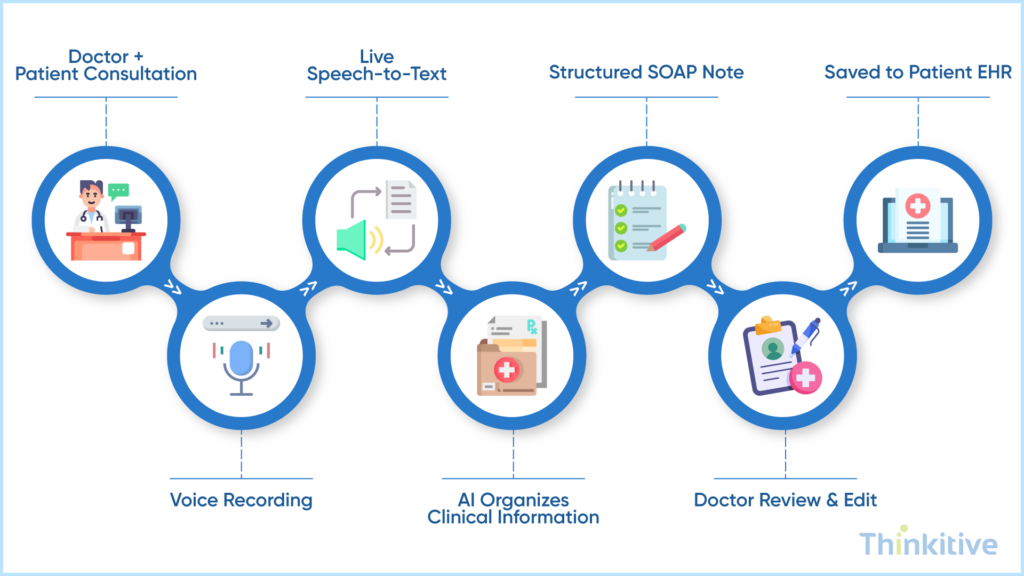
The key to designing an efficient voice-to-text clinical documentation system is to naturally fit it into the provider’s existing documentation process with minimal to no extra steps that disrupt patient interactions. From capturing speech to storing finalized notes, every stage should prioritize speed, accuracy, security, and ease of use.
Here is a quick overview of how a typical voice-to-text documentation workflow would look:
- Capture Provider Speech: To record the provider’s voice securely during or immediately after the patient encounter.
- Convert Speech to Clinical Text: Use a medical speech recognition engine to accurately transcribe spoken words into text format.
- Generate Structured Clinical Notes: Process the transcription using AI and NLP to create standardized documentation such as SOAP notes or progress notes.
- Review & Approve Documentation: This allows providers to edit, validate, and approve generated notes before they are updated into the patient’s medical record.
- Store & Synchronize Notes: Save the finalized documentation securely within your EHR and synchronize it across relevant clinical, billing, and interoperability modules.
When you design a workflow that aligns with existing clinical processes, you can reduce documentation efforts, improve provider adoption of technologies, and ensure that voice-enabled documentation becomes a seamless part of your day-to-day patient care activities.
Security & Compliance Considerations for Voice-Enabled EHR Systems
The voice recordings and transcriptions often contain Protected Health Information (PHI); security and compliance should be built into every stage of the documentation workflows. Right from capturing audio to storing finalized clinical notes, you must ensure that the voice data is protected against unauthorized access, breaches, and misuse.
Consider these essential security measures when building voice-to-text EHR:
| Security Consideration | Why It Matters |
| HIPAA Compliance | Ensures voice recordings and transcripts are handled according to regulatory requirements for PHI. |
| Encryption | Protects voice data during transmission and while stored, reducing the risk of unauthorized access. |
| Role-Based Access Control (RBAC) | Restricts access to recordings and clinical notes based on user roles and permissions. |
| Audit Trails | Tracks who created, edited, reviewed, or accessed voice-generated documentation for accountability. |
| Secure Data Storage | Protects recordings and transcripts using secure cloud or on-premise storage with backup and recovery. |
| Data Retention Policies | Defines how long voice recordings and transcripts are retained and when they should be securely deleted. |
Conclusion
Voice-to-text clinical documentation is transforming how healthcare providers create and manage patient records. You see, it can significantly contribute to reducing manual documentation and improving clinical efficiency.
However, if you have been paying attention, then you must have realized that to build this capability into your EHR system, it requires more than just integrating a speech recognition engine. It spans from designing secure workflows and selecting the right technology to leveraging AI for structured documentation and seamless integration into the existing clinical pathways.
By following the right development approach, you can build an ambient clinical documentation for EHR with an enhanced focus on accuracy, compliance, scalability, and user experience.
So, what are you waiting for? Streamline your documentation processes by building an EHR system , with a voice-enabled system to reduce time and improve care quality. Book your free demo to witness how it works.
Frequently Asked Questions
Voice-to-text clinical documentation is a feature that allows healthcare providers to create voice-to-text clinical notes by speaking instead of typing. Using medical speech recognition, the system converts spoken words into text, which can then be reviewed, edited, and stored within the EHR. Modern solutions may also use AI to organize the transcription into structured clinical documentation.
Medical speech recognition captures a provider’s spoken input, converts it into text, and recognizes clinical terminology, medications, diagnoses, and specialty-specific vocabulary. Unlike generic speech recognition, healthcare-focused solutions are trained on medical language to improve transcription accuracy and integrate seamlessly with EHR documentation workflows.
Speech recognition converts spoken words into text, while AI-assisted documentation goes a step further by analyzing the transcription, extracting clinical information, and generating structured notes such as SOAP or progress notes. Organizations planning to build EHR with AI scribe capabilities often combine speech recognition with AI to automate documentation and reduce manual editing.
To build EHR voice-to-text capabilities, organizations need secure audio capture, a medical speech recognition engine, NLP for clinical language processing, structured note generation, provider review workflows, and secure EHR integration. Following a structured approach to how to build voice-to-text features in EHR helps ensure accurate, scalable, and compliant clinical documentation.
Healthcare organizations should evaluate transcription accuracy, medical vocabulary support, clinical workflow compatibility, EHR integration, scalability, security, compliance, and total cost of ownership. Comparing the best speech-to-text engines for medical software can help determine whether a generic speech engine, medical speech recognition platform, or AI-powered documentation solution best fits organizational needs.
Yes, voice-to-text clinical documentation can be HIPAA compliant when implemented with appropriate safeguards. Organizations should ensure encryption of voice data in transit and at rest, role-based access controls, audit trails, secure storage, and HIPAA-compliant handling of all recordings and transcripts containing Protected Health Information (PHI).
Common challenges include achieving high transcription accuracy, recognizing specialty-specific medical terminology, minimizing background noise, integrating with existing EHR workflows, maintaining HIPAA compliance, and ensuring provider adoption. Addressing these challenges early helps organizations build reliable and scalable voice-enabled documentation systems.
Voice-to-text documentation reduces the need for manual typing, accelerates clinical note creation, and enables providers to complete documentation more efficiently. When combined with AI-powered workflows, it can further streamline documentation, reduce administrative burden, and allow clinicians to spend more time focusing on patient care.
Yes. Modern voice-enabled documentation platforms can be customized with specialty-specific vocabularies, templates, clinical workflows, and documentation formats. They can also be integrated with ambient clinical documentation for EHR solutions or AI-assisted note generation to meet the unique requirements of specialties such as cardiology, orthopedics, behavioral health, and primary care.


