Must-Have Advanced Features in Custom EHR Software for 2026

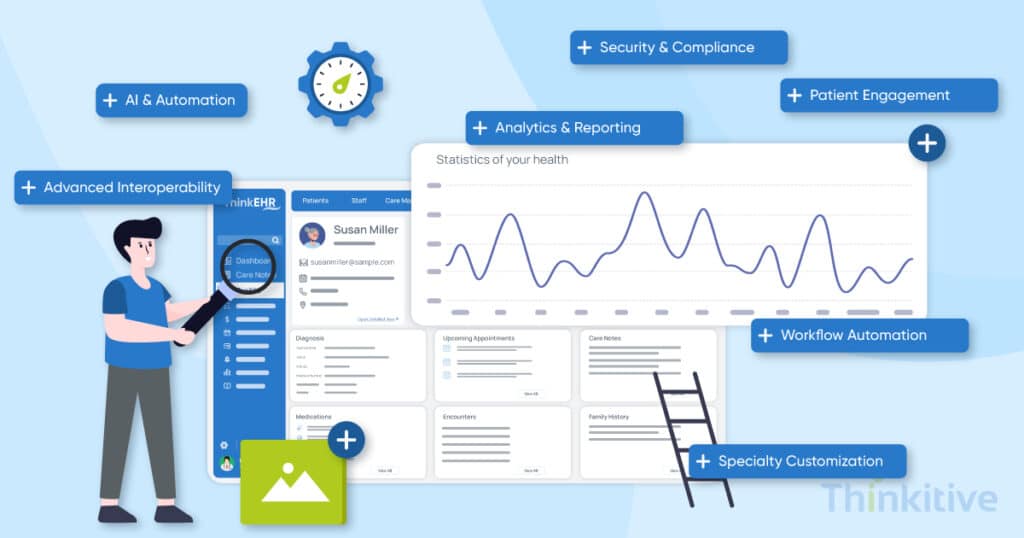
Some problems in the healthcare industry, and especially with the healthcare software systems, are persistent. And this is taking a toll on healthcare providers. A survey stated that 93% of the physicians reported feeling burned out on a regular basis.
This statistic did not surprise me, as we all know that healthcare professionals are often overworked. However, after digging deeper into the survey, I came across an interesting stat that stated 60% of physicians said their EHR system does not contribute to reducing their time spent on administrative tasks.
And this is something that you should be worrying about, because the whole purpose of EHRs was to reduce administrative tasks and give providers more time with their patients.
Upon investigating further to find a common thread between all these systems, I realized that the features and functionalities of the EHR software systems simply seem to be mismatched. Recent data shows that 70% of the hospitals have implemented some kind of AI or predictive modeling in their system.
But let’s be honest, is AI the solution to everything?
While providers have realized that a generic EHR system cannot meet their unique needs and requirements, they are slowly turning their heads towards customizable EHRs.
Now, while they’ve realized the best possible way to develop their EHR system, something where many providers fail is recognizing the right features and functionalities for their custom EHR software.
And with AI being a dominant factor in development, I have decided to pen down this blog to help you choose the must-have and must-have advanced features in a custom EHR.
On that note, let’s get started!
Download Essential Advanced Feature List for Your EHR
Free DownloadWhat Features Should Every Custom EHR Include?
Now, before we start discussing AI, interoperability, patient engagement and all the other advanced capabilities, let’s first understand the features that every modern custom EHR should include. While the exact feature set depends on your specialty and workflows, these are the capabilities that have become essential for building a future-ready EHR in 2026.
Must-Have Custom EHR Features (2026)
- AI-Powered Clinical Documentation & Workflow Automation
- Intelligent Interoperability with FHIR-Based Data Exchange
- Specialty-Specific Clinical Workflows
- End-to-End Revenue Cycle Management (RCM)
- Patient Empowerment & Engagement Tools
- Advanced Clinical Decision Support System (CDSS)
- Integrated Telehealth & Remote Patient Monitoring (RPM)
AI-Powered Clinical Documentation & Workflow Automation
AI-powered clinical documentation automates note creation, reduces administrative workload, and helps physicians spend more time with patients instead of paperwork to complete administrative tasks.
It is one of the must-have EHR features for 2026, where you combine AI for automation and integrate intelligent workflows to improve documentation accuracy and clinical efficiency.
- AI Ambient Listening: AI Ambient Listening securely captures provider-patient conversations and automatically converts them into structured clinical notes. As one of the next-generation custom EHR features, it minimizes manual charting and allows physicians to focus more on delivering quality care.
- Natural Language Processing: Natural Language Processing (NLP) transforms unstructured conversations into meaningful clinical documentation. It supports voice-to-text transcription, care episode summaries, template auto-filling, and structured note generation to accelerate documentation.
- Automated Documentation Workflows: Automated documentation workflows route information from patient intake to clinical notes, orders, referrals, and billing with minimal manual effort. These advanced EHR capabilities for modern healthcare streamline administrative processes while improving operational efficiency.
Having these three advanced EHR features and functionalities, you can reduce your manual patient charting efforts. However, the most important factor in this is the factor of accuracy. It can remove most of the barriers to data sharing and minimize burnout by reducing, if not eliminating, providers’ pajama time.
Intelligent Interoperability with FHIR-Based Data Exchange
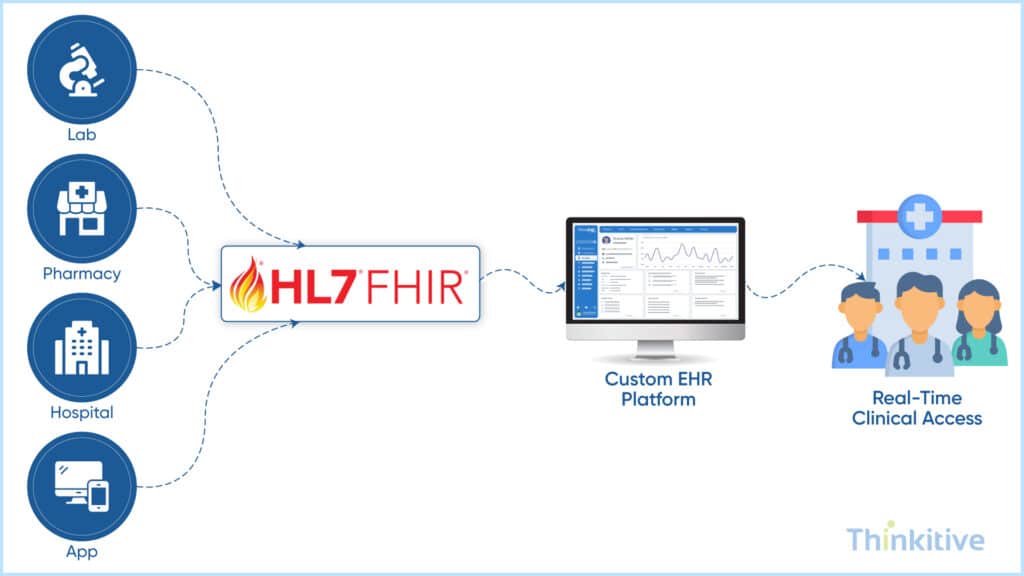
FHIR-based interoperability enables a custom EHR to securely exchange patient data across labs, pharmacies, hospitals, imaging centers, and third-party healthcare applications. As one of the future-ready EHR software features, it improves care coordination while reducing duplicate data entry and disconnected workflows.
- FHIR-Based Data Exchange: A FHIR-first architecture enables standardized, real-time data exchange between healthcare systems. It provides the flexibility to integrate new applications, scale with your organization, and support evolving interoperability requirements.
- Integrated Labs and Imaging: Seamless integration with laboratories and radiology providers automates order management and result reporting. Providers receive test results directly within the EHR, helping accelerate diagnosis and treatment decisions.
- Unified Longitudinal Patient Records: Interoperability brings patient information from multiple systems into a single longitudinal record. This reduces duplicate tests, improves documentation accuracy, and gives providers a complete view of a patient’s healthcare journey.
Some of the other benefits of this include data validation, with all the external systems being connected to your system. On top of that, it can also be extremely helpful in managing the consent of your patients.
Know What Interoperability Approach Your Practice Requires –
Get Free ConsultationSpecialty-Specific Customization
One of the biggest reasons healthcare organizations choose a custom EHR is the need for flexibility and specialty-specific customization. Every specialty has unique clinical workflows, documentation requirements, and treatment protocols, but most generic EHRs are designed for standardized workflows that cannot fully support your unique clinical and administrative needs.
As a result, providers often have to adapt their processes to the software instead of using an EHR that fits the way they deliver care. Custom EHRs solve this by allowing workflows, templates, forms, and clinical tools to be tailored for each specialty. Here are a few examples of how EHRs are customized across different healthcare specialties.
| Specialty | Key Customizations in a Specialty-Specific EHR |
| Pediatrics | Growth charts, vaccine schedules, pediatric dosing calculators, parent/guardian access controls, developmental milestone tracking. |
| Behavioral Health | Therapy note templates, DSM-5 coding, teletherapy tools, PHQ/GAD assessments, treatment plans, group session documentation, privacy-sensitive permissions. |
| Oncology | Chemotherapy workflows, tumor staging, oncology-specific order sets, treatment timeline tracking, lab/imaging integrations, toxicity monitoring. |
| Dental | Tooth charts, periodontal charts, imaging integrations (X-ray, intraoral scans), procedure codes, treatment plans, appointment recall workflows. |
| Surgical Centers | Pre-op assessments, surgical checklists, consent management, OR scheduling, anesthesia records, post-op care plans, device/implant tracking. |
If you want to know how custom EMR solutions for specialized practices can change their practice, read our blog – Custom EMR Solutions for Specialized Practices.
End-to-End Revenue Cycle Management (RCM) with Automation
An integrated Revenue Cycle Management (RCM) system automates billing, insurance verification, claims processing, and patient payments within your custom EHR. As one of the advanced EHR capabilities for modern healthcare, it reduces administrative work, improves reimbursement accuracy, and accelerates revenue collection.
- Automated Claims Submission: Automatically generate and submit claims using clinical documentation captured during care delivery. This reduces manual data entry, improves coding accuracy, and accelerates reimbursement.
- Real-time Insurance Verification: Verify patient eligibility and coverage during scheduling or registration to identify issues before care is delivered. This helps reduce billing errors and avoidable claim denials.
- Denial Prevention through Predictive Analytics: Use AI-powered analytics to detect coding errors, missing documentation, and claim inconsistencies before submission. This improves first-pass claim acceptance and reduces revenue leakage.
- Patient Payment Options: Enable secure online payments, digital invoices, and flexible payment plans within the patient portal. This simplifies the payment experience while improving collection efficiency.
Patient Empowerment & Engagement Tools
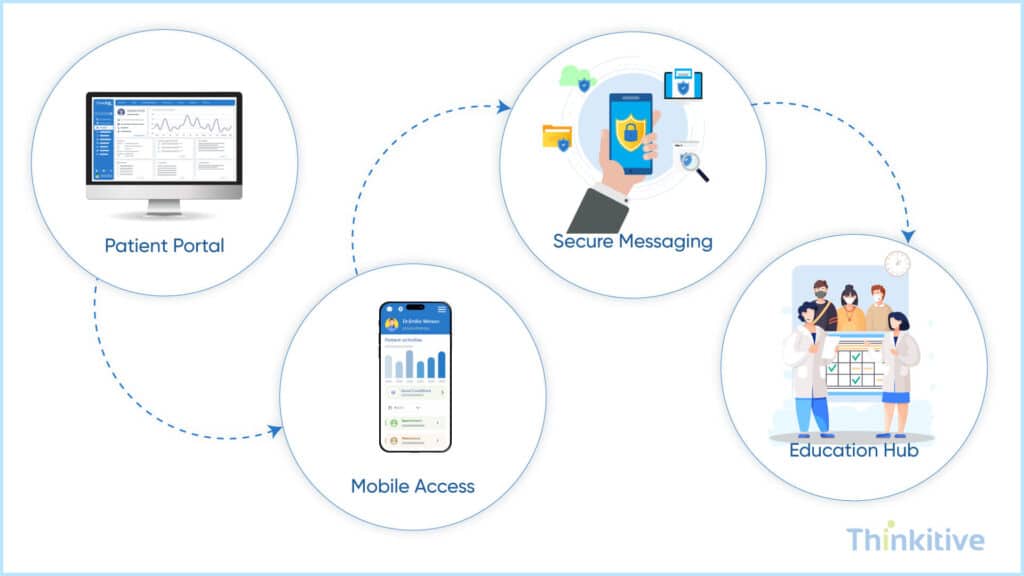
Patient engagement tools enable patients to actively participate in their healthcare by providing secure access to records, appointments, communication, and educational resources. As one of the future-ready EHR software features, they strengthen patient-provider relationships while supporting better health outcomes and value-based care.
- Patient Portal: A patient portal gives individuals secure access to their medical records, lab results, prescriptions, appointments, and care plans from a single platform. It improves transparency while making healthcare more accessible and convenient.
- Mobile Access: Mobile access allows patients to schedule appointments, view health information, receive reminders, and connect with care teams anytime, anywhere. This improves accessibility and encourages continuous engagement throughout the care journey.
- Secure Messaging: Secure messaging enables patients and providers to communicate safely without relying on phone calls or unsecured emails. It helps answer questions faster, improves follow-up care, and reduces communication gaps.
- Personalized Education: Personalized education delivers condition-specific resources, treatment instructions, and preventive care recommendations based on each patient’s health profile. Well-informed patients are more likely to follow care plans and achieve better outcomes.
Features You Need for Better Patient Engagement –
Free DownloadNow, these tools cover most of the communication gaps that are generally seen in the traditional model of care delivery. For instance, a patient portal gives them instant access to care, and they can easily text the provider with any concerns. This way, they can get personalized consultation over text from the provider and even suggest additional precautions.
Moving ahead, they can even access the available education material to understand their health better and can take control of their health. While this is just one of the use cases of patient engagement features, it can go beyond normal functioning and can prove to be life-saving in some instances.
To know more about the custom EHR and the advanced features in custom EHR software that can empower your patients and help you in successfully transitioning to value-based care delivery options, read this blog – Patient Empowerment through Custom EHR.
Advanced Clinical Decision Support System (CDSS)
A Clinical Decision Support System (CDSS) helps providers make faster, evidence-based decisions by analyzing patient data and delivering real-time clinical recommendations. As one of the advanced EHR capabilities for modern healthcare, it improves patient safety, supports better clinical outcomes, and reduces preventable medical errors.
Here are some of the must-have EHR features for 2026 that every modern Clinical Decision Support System should include.
| CDSS Capability | How It Works | Benefit to Providers & Patients |
| AI-driven clinical guidance | Analyzes labs, vitals, medications, and patient history to offer context-aware suggestions. | Supports more accurate, personalized, and faster clinical decisions. |
| Real-time safety alerts | Detects drug interactions, allergies, contraindications, and abnormal results instantly. | Improves patient safety and reduces preventable medical errors. |
| Evidence-based recommendations | Surfaces guidelines, care pathways, and proactive insights from clinical best practices. | Ensures standardized, high-quality care aligned with the latest evidence. |
| Predictive risk analytics | Identifies early signs of deterioration, complications, or high-risk conditions using pattern recognition. | Enables early intervention, reducing hospitalizations and adverse outcomes. |
These advanced EHR features transform clinical data into actionable insights, enabling providers to make more confident decisions while delivering safer, higher-quality patient care.
Integrated Telehealth & Remote Patient Monitoring (RPM)
Integrated telehealth and Remote Patient Monitoring (RPM) extend care beyond the clinic by enabling virtual consultations and continuous patient monitoring within a single EHR. As one of the future-ready EHR software features, it helps providers deliver connected, proactive, and patient-centered care while improving access to healthcare services.
- Telehealth Integration: Integrated telehealth allows your providers to conduct secure virtual consultations, document visits, prescribe medications and schedule follow-ups without having the need to move to a different application. This creates a seamless digital care experience for both providers and patients.
- Remote Patient Monitoring (RPM): RPM integration connects the EHR with wearable devices and remote monitoring equipment to capture real-time patient health data. Continuous monitoring enables providers to identify early signs of deterioration and intervene before conditions become critical.
- Virtual Care Workflows: Modern telehealth platforms also support virtual patient intake, remote prescribing, automated follow-up reminders, and care coordination. These advanced EHR features simplify digital care delivery while improving continuity of care, especially for patients managing chronic conditions.
Some of the modern EHR software features for 2026 include secure digital consults, virtual intakes and remote prescribing. To offer your patients a more holistic experience, this will also include alerts for deterioration. This is crucial for chronically ill patients, as providing care to chronic patients becomes much easier.
Together, telehealth and RPM create a connected care ecosystem where providers can deliver timely interventions, monitor patients remotely, and improve long-term health outcomes beyond traditional in-person visits.
Essential Features vs Advanced Features
Every EHR should have a strong foundation of essential features with advanced capabilities that help in improving efficiency, interoperability, and patient outcomes. In this, choosing the right combination is very important, and it depends on your specialty, practice size, and long-term growth goals.
Here is a short table to help you understand the difference and importance of essential and advanced features:
| Essential Feature | Why It Matters | Advanced Feature | Additional Value |
| Clinical Documentation | Records patient encounters | AI Documentation | Automates note creation and reduces physician burnout |
| Patient Portal | Gives patients access to records | RPM & Telehealth | Enables continuous care beyond clinic visits |
| Billing | Manages claims | Predictive Analytics | Prevents denials before claim submission |
| Interoperability | Shares patient data | FHIR APIs | Enables real-time integration with external systems |
How to Prioritize Features for Your Practice
There is only one foolproof way to prioritize features of your EHR software for your practice, and that is by aligning your specialty, workflows, patient population, and long-term growth goals.
This way, you will actually develop the features that you need and not try to get everything in a single software. Here is a quick table to help you prioritize the features depending on your unique needs:
| Consider This | Prioritize These Features |
| Practice Specialty | Specialty-specific workflows, templates, clinical documentation, and decision support tools. |
| Practice Size | Scheduling, patient portal, billing automation, and scalable interoperability. |
| Patient Population | Telehealth, Remote Patient Monitoring (RPM), multilingual patient engagement, and personalized education. |
| Administrative Challenges | AI-powered documentation, workflow automation, insurance verification, and automated claims submission. |
| Growth & Scalability | FHIR-based interoperability, cloud architecture, API integrations, analytics, and modular feature expansion. |
Why Build a Custom EHR Instead of Using Standard Software?
Standard EHR systems are built to satisfy all the generic needs and requirements of healthcare practice. This allows practices to quickly adopt and get started with their care delivery and other processes. However, as clinical workflows are becoming increasingly specialized and digital transformation accelerating, may practices have started to shift from generic system to custom EHR systems to support their clinical and operational needs.
You see, a customized EHR allows practices to build their software’s workflows around your practice. From specialty-specific documentation and AI-powered automation to FHIR interoperability and scalable integrations, every feature can be tailored to the way your practice delivers care.
If your organization is planning to expand services, improve operational efficiency, or adopt value-based care, building a custom EHR offers the flexibility to evolve without being limited by vendor roadmaps or unnecessary features.
Conclusion
Building your EHR system from scratch is not just about digitizing patient records, in fact, it is about creating a system that aligns with your clinical workflows, operational goals and long-term vision.
Here, the right combination of AI-powered documentation, interoperability, specialty-specific workflows, patient engagement, revenue cycle management, clinical decision support and telehealth capabilities to help practices improve efficiency while delivering better patient care.
And since you’re here due to the mercy of the internet and still reading it, all the features that we discussed earlier in this blog will not only make your customizable EHR intelligent, interoperable, patient-focused, and specialty-ready.
On that note, let this blog be your guide for choosing the right features for your EHR software, and get a free demo from our EHR expert about customizable EHR to know what features suit your practice best.
Frequently Asked Questions
Basic features of EHR systems focus on documentation, charting, e-prescribing, and patient demographics.
In contrast, next-generation custom EHR features for 2025–2026 introduce intelligent automation, AI-assisted charting, advanced interoperability, workflow personalization, and predictive analytics.
These advanced EHR features turn the EHR from a record-keeping tool into a clinical decision, efficiency, and patient-engagement platform, making them essential for future-ready healthcare.
AI enhances advanced EHR solutions by:
- Flagging abnormal values with predictive alerts
- Suggesting diagnoses based on structured/unstructured data
- Auto-recommending treatment pathways and medication plans
- Reducing documentation errors through NLP-driven charting
- Identifying patient risks earlier through predictive modeling
These advanced software features for EHR help clinicians make faster, more accurate decisions while minimizing cognitive load.
By 2026, advanced interoperability EHR software capability will be both a regulatory expectation and a competitive differentiator.
FHIR-based APIs, data-sharing with HIEs, and cross-platform communication are crucial for compliance with ONC/CMS rules—especially related to patient access, information blocking, and quality reporting.
At the same time, organizations using future-ready EHR software features gain smoother integrations, better care coordination, and reduced administrative friction.
The key features of EHR that offer the strongest ROI include:
- Specialty-specific templates & workflows
- AI-driven documentation and coding
- Automated prior authorizations
- Advanced analytics dashboards
- Integrated telehealth and remote monitoring
- Seamless lab and imaging integrations
These custom EHR system features drastically reduce administrative work, improve clinical throughput, and enhance billing accuracy—making them must-have EHR features for 2026.
These important features of EHR systems increase engagement by enabling:
- Real-time access to records, prescriptions, and lab results
- Direct, secure communication with care teams
- Appointment self-scheduling and reminders
- Mobile app access that supports continuous care
When patients have more visibility and control, adherence improves, satisfaction rises, and no-show rates drop.
A modern EHR requires advanced EHR capabilities for modern healthcare, such as:
- End-to-end encryption
- Zero-trust access controls
- Multi-factor authentication
- Comprehensive audit trails
- HIPAA, SOC 2, and GDPR compliance
- Role-based permissions
- Continuous threat monitoring
These custom EHR software features protect patient data and ensure regulatory alignment as cybersecurity risks grow.
Implementing advanced features in custom EHR software usually takes 4 to 12 months, depending on:
- Number of advanced modules required
- Complexity of workflows
- Integration requirements
- Data migration needs
- Training and go-live support
Pre-built healthcare accelerators and reusable modules can shorten timelines significantly.
Advanced EHR features for 2026 are now accessible to small and mid-size practices thanks to modular pricing and scalable cloud architectures.
Organizations can implement only the must-have advanced features in custom EHR they need today and add others later.
Large hospitals still benefit from full-scale customization, but SMB practices no longer face prohibitive costs.
The best approach is to rank advanced EHR features based on:
- Clinical impact (reducing workload, errors, or wait times)
- Revenue impact (improving coding accuracy, faster reimbursements)
- Regulatory necessity (interoperability, security)
- Scalability (features that will matter in 2026 and beyond)
Start with the must-have EHR features for 2026, then expand into optional enhancements as the budget allows.
Some training is necessary, but modern advanced EHR solutions are designed for usability.
Training typically includes:
- Hands-on workflow sessions
- Role-specific modules
- Short video guides and micro-learning
- Go-live support and Q&A
- Continuous optimization after adoption
AI-driven interfaces and intuitive dashboards often reduce the learning curve significantly.


