Building Custom Lab Orders & Results Module for Your EHR

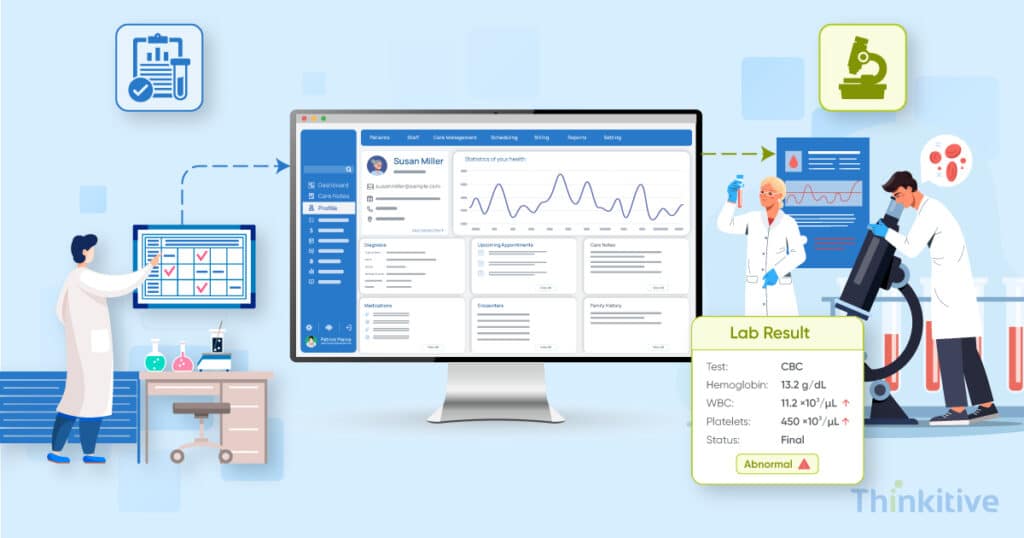
Did you know more than 14 billion laboratory test results are ordered in the U.S. every year?
According to this report by the ONC, in 2024 alone, almost 14 billion laboratory test orders have been placed, highlighting the importance of laboratory data as a critical component for timely and accurate clinical decision-making.
However, moving this laboratory data from a provider’s order to the laboratory and back into the EHR is far more complex than simply displaying the test result on the EHR screens.
You see, a well-designed lab orders and result module must be embedded into the entire clinical and administrative workflows, right from selecting and submitting a test to tacking specimens, receiving structured results, identifying abnormal or critical values, and routing the right results to the right provider.
Along with this, you might also be required to exchange data reliably with external laboratories using interoperability standards like HL7 and FHIR. This is one of the best ways to maintain standardized terminology, patient and order matching, auditability, and security.
For healthcare practices building a custom EHR, building an EHR lab orders module is a critical part of the platform’s clinical and interoperability architecture. This not only helps them in digitizing lab orders, but also in creating a connected, reliable workflow that helps clinicians access the right results at the right time and act at the right time.
On that note, let this blog be your guide to explain key features, data standards, architecture, integration considerations, and how to build a lab orders module in an EHR.
So without further ado, let’s get started!
Assess Your System & Build Your EHR System with Lab Ordering & Result Retrieving Module –
Watch DemoWhat Is the Lab Orders and Results Workflow?
The lab orders and results workflow is the complete digital lifecycle of a laboratory test. It starts from the provider placing an order and specimen collection to laboratory analysis, result transmission, provider review, and acknowledgment within the EHR.
Though the workflow may appear quite straightforward and simple to the end user, there are several systems involved in the process, and data exchanges often happen behind the scenes. This is how a typical workflow involves:
- Order Placement: The provider selects the required laboratory test, associates it with the appropriate diagnosis or clinical indication, specifies priority, and submits the order through the EHR.
- Order Transmission: The EHR then sends the order to the selected laboratory system through an HL7 interface, FHIR API, or another supported integration method.
- Specimen Collection: The laboratory then receives the order, collects the required specimen, and associates it with the patient and orders using identifiers such as patient ID, order ID, and accession or specimen number.
- Laboratory Analysis: The laboratory processes the specimen and generates structured results, including values, units, reference ranges, interpretations, and result status.
- Result Transmission: The completed results are transmitted back to the EHR and matched to the correct patient, order, and encounter.
- Result Review and Acknowledgment: The EHR makes the result available to the responsible provider, flags abnormal or critical findings where applicable, and records that the provider reviewed or acknowledged the result.
Now, while looking at this workflow from the outside, you might think that the workflow is super tight and cannot easily break. Well, you can be wrong. You see, a lab workflow can fail at almost any point between order placement and result acknowledgment. Here are some of the most common examples:
- Orders with no matching results: An order may be submitted successfully, but the expected result never reaches the EHR because of a rejected order, specimen issue, interface failure, or missing result message.
- Results filed to the wrong encounter: Poor patient, order, or encounter matching can cause a result to be associated with the wrong clinical context.
- Unacknowledged results: A result may successfully reach the EHR but remain unnoticed, particularly when abnormal or critical results are not surfaced effectively to the responsible provider.
These failure points are why a building EHR lab orders module needs to be more than basic order-entry and result-display functionality. It must provide end-to-end tracking, reliable data matching, exception handling, status management, and provider acknowledgment throughout the entire workflow.
How Do You Build a Lab Orders Module in an EHR?
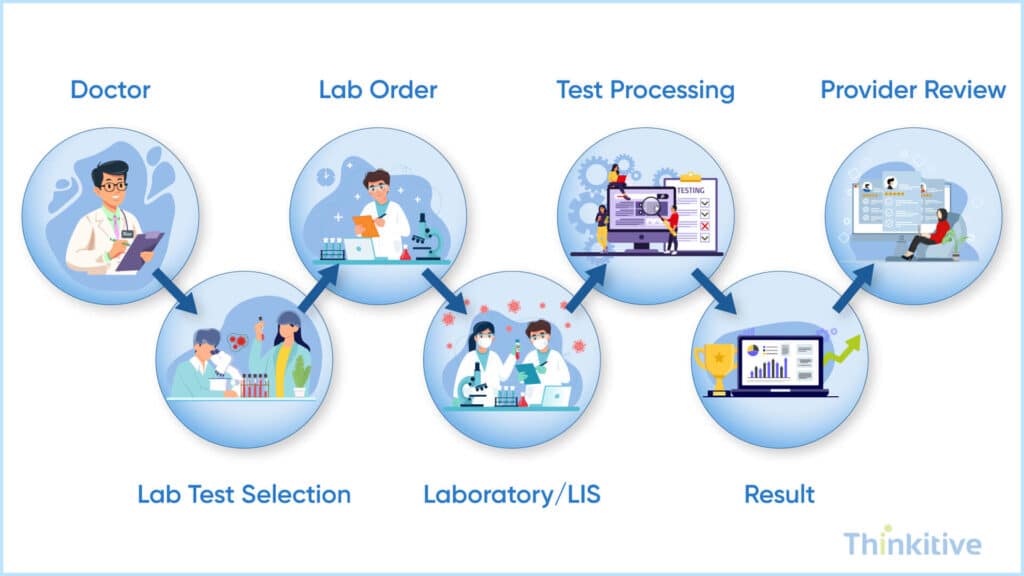
Building a lab orders module involves six connected stages starting from standardizing the test catalog to placing orders to transmitting them, processing results, and reconciling missing or unmatched data.
Here are the six connected stages that are involved in this:
- Define the Test Catalog: Create a structured catalog of orderable tests and map each test to LOINC. This will include details like specimen type, collection requirements, reference ranges, and laboratory-specific mappings wherever needed.
- Build Order Entry: Create an intuitive ordering workflow with test search, order sets, diagnosis capture, specimen requirements, priority, and laboratory selection. This allows providers to place complete and standardized orders without unnecessary steps.
- Build Outbound Transmission: Transmit completed orders securely to the laboratory’s LIS using HL7, FHIR, or supported laboratory APIs. Track the order status and capture identifiers returned by the laboratory.
- Building Inbound Result Ingestion: Receive and validate laboratory results, then match them to the correct patient, order, specimen, and encounter before filing them in the EHR. Support structured values, units, reference ranges, and abnormal indicators.
- Build Result Review and Acknowledgment: Give providers a clear workflow for reviewing results, identifying abnormal or critical values, and recording acknowledgment. Support notifications, follow-up actions, and audit trails where required.
- Build Reconciliation and Audit: Monitor orders that are rejected, canceled, delayed, unmatched, or never return a result. Reconciliation tools help staff identify missing results and resolve interface or data-matching issues before they affect patient care.
Read How to Build EHR That Supports CMS Quality Reporting –
Access Free GuideHandling Results Once They Come Back
Once laboratory results reach the EHR, the module must correctly file, review, prioritize, and track without losing clinical history or allowing important findings to be overlooked.
Here are the results management areas in the workflows and what the EHR module should handle:
| Result Management Area | What the EHR Module Should Handle |
| Structured Result Filing | Match results to the correct patient, order, specimen, and encounter and store values, units, reference ranges, status, and timestamps as structured data. |
| Provider Review & Acknowledgment | Route results to the appropriate provider or care team and track whether each result is new, reviewed, acknowledged, or requires follow-up. |
| Abnormal & Critical Values | Automatically flag abnormal and critical findings and trigger appropriate alerts while supporting documented follow-up. |
| Corrected & Amended Results | Preserve the original result and maintain a clear version history when laboratories send preliminary, corrected, or amended results. |
| Duplicate & Unmatched Results | Detect duplicate, incomplete, or unmatched results and route uncertain records for manual reconciliation rather than filing them incorrectly. |
Note: Receiving a lab result is not the end of the workflow. A well-designed EHR module must ensure that every result reaches the right clinician, receives appropriate attention, and remains accurately traceable throughout its lifecycle.
Standards Lab Orders and Results Depend On
Laboratory interoperability relies on multiple standards; each of these standards serves a different role. For instance, some standards help in transmitting orders and results, consistently identifying tests and clinical observations. When building an EHR lab module, the key standards to consider include HL7 v2, LOINC, and FHIR.
- HL7 vs ORM and OML for Outbound Lab Orders: HL7 v2 ORM and OML messages can be used to transmit laboratory orders from the EHR to a laboratory or LIS. They carry information such as the patient, ordering providers, requested test, specimen requirements, and order details, allowing the receiving system to process the request.
- HL7 vs ORU for Inbound Lab Results: HL7 v2 ORU messages are commonly used to send laboratory results from the LIS back to the EHR system. The message can include result values, units, reference ranges, abnormal indicators, specimen information, and other clinical details that the EHR needs to file and present to providers.
- LOINC for Standardized Test Identification: LOINC standards for Logical Observation Identifiers Names and Codes. It basically provides standardized identifiers for laboratory tests and clinical observations. Mapping tests to LOINC helps different laboratories and EHR systems recognize the same clinical test consistently even when local test names or codes differ from each other.
- FHIR ServiceRequest and Observation for API-Based Exchange: For modern, API-based interoperability, FHIR provides standardized resources for exchanging laboratory information. ServiceRequest can represent a laboratory order, while Observation can represent individual laboratory results or measurements. DiagnosticReport can also be used when results need to be grouped into a broader diagnostic report.
How These Standards Work Together
A custom EHR can combine these standards to support the complete laboratory workflow.
Here is how a typical workflow would look:
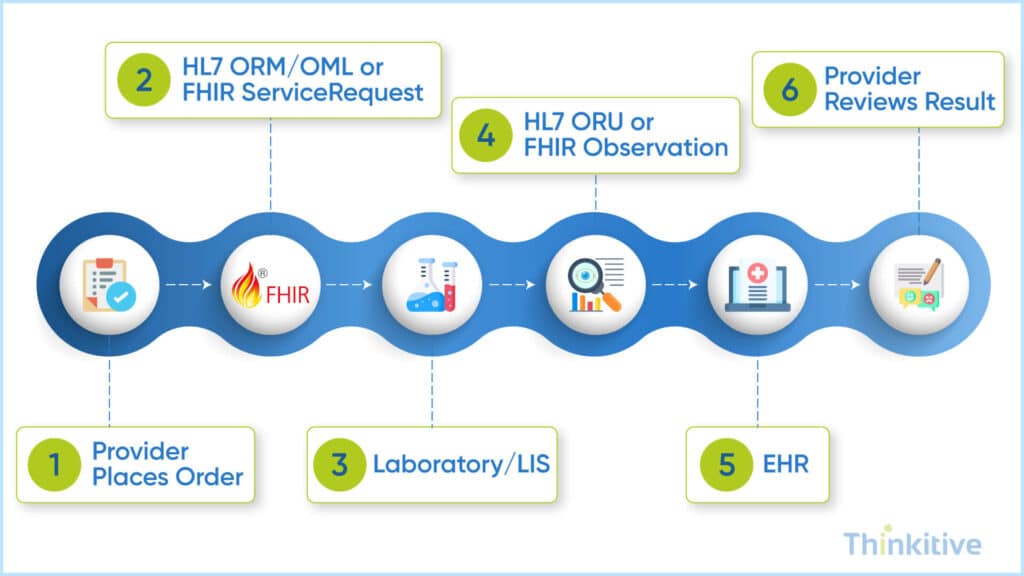
The specific standards and interfaces used will depend on the laboratory, integration requirements, and interoperability environment, but designing the module around standardized data exchange makes it easier to connect with multiple laboratory systems and maintain consistent clinical data.
Choose the Standards that You Need –
Get Free Consultation
Compliance Requirements for Laboratory Data
Building an EHR lab orders and results module requires more than interoperability. The workflows must also account for laboratory quality requirements, patient privacy, critical-result communication, and patient access to electronic health information.
Here are the compliance requirements and their specific requirements that your ER lab module must support:
| Compliance Area | What the EHR Lab Module Should Support |
| CLIA Requirements | Support accurate, reliable, and timely handling of laboratory results and preserve the information needed for proper reporting and traceability. CLIA also requires laboratories to immediately alert the appropriate individual or entity when a result indicates an imminently life-threatening condition or a panic/alert value. (Centers for Medicare & Medicaid Services) |
| Critical Value Reporting | Provide workflows for flagging critical results, documenting when and how the responsible provider was contacted, and recording acknowledgment or follow-up. CLIA guidance specifically calls for documentation around the reporting of critical results. (Centers for Medicare & Medicaid Services) |
| HIPAA & HITECH | Protect laboratory information as protected health information through appropriate access controls, authentication, audit trails, secure transmission, and disclosure controls. Patients also have rights to access their completed laboratory test reports under HIPAA. (HHS.gov) |
| 21st Century Cures Act | Design the module to support timely access, exchange, and use of electronic health information and avoid practices that could constitute information blocking. Patient access and information-sharing workflows should account for applicable information-blocking exceptions. (ONC) |
Note: Compliance should be considered during the module’s architecture and workflow design and not added as a layer. It is important for critical-result alerts, auditability, patient access, and corrected or amended results.
Conclusion
A well-designed lab orders and results module should connect the entire laboratory workflow from test ordering and result exchange to provider review, critical-value follow-up, reconciliation, and patient access.
So by combining HL7, FHIR, LOINC, secure data handling, and strong clinical workflow, practices can build an EHR lab module that is interoperable, traceable, and easier for clinicians to act on.
In a nutshell, providing the right laboratory information to the right provider at the right time without missing anything is the final goal.
On that note, know which EHR features to build for your custom EHR system. Get your first free consultation with our EHR expert.
Frequently Asked Questions
A lab orders module is an EHR component that allows providers to order laboratory tests electronically, transmit orders to laboratories, receive results, and manage provider review and acknowledgment. A well-designed module supports the complete lab orders workflow in an EHR, including test selection, specimen requirements, result matching, abnormal-value alerts, and reconciliation.
To build an EHR lab orders module, organizations typically define the test catalog and terminology mappings, design the order-entry workflow, integrate with laboratory information systems (LIS), build inbound result processing, and implement provider review and reconciliation workflows. A reliable implementation should also account for standards such as HL7, FHIR, and LOINC, along with security, auditability, and applicable compliance requirements.
A typical lab orders workflow in an EHR starts when a provider selects a test and submits an electronic order. The order is transmitted to the laboratory or LIS, the specimen is collected and analyzed, and the resulting data is returned to the EHR. The EHR then matches the result to the correct patient and order, flags abnormal or critical findings, and routes the result to the appropriate provider for review and acknowledgment.
LIS integration in EHR systems enables laboratory orders and results to move electronically between the EHR and the laboratory information system without relying on manual data entry. A well-designed LIS integration architecture for EHR systems can improve data accuracy, reduce duplicate work, support real-time or near-real-time result exchange, and provide better visibility into order and result status.
EHR laboratory workflows commonly rely on HL7 v2, FHIR, and LOINC. HL7 v2 messages such as ORM/OML can support outbound orders, and ORU messages can transmit results, while FHIR resources such as ServiceRequest and Observation support API-based exchange. LOINC provides standardized identifiers for laboratory tests and observations, helping different systems interpret clinical data consistently.
LOINC (Logical Observation Identifiers Names and Codes) is a standardized terminology used to identify laboratory tests, clinical measurements, and observations. LOINC coding in EHR systems helps ensure that the same test can be recognized consistently across different laboratories and healthcare systems, which is especially important for EHR lab results integration, data exchange, analytics, and longitudinal patient records.
Corrected or amended laboratory results should update the clinical record without silently overwriting its history. The EHR should preserve the original result, clearly identify the revised result and reason for the correction, notify the appropriate provider when necessary, and maintain an audit trail showing when the change occurred and who reviewed it.
CLIA primarily regulates laboratory testing and laboratory operations rather than prescribing a specific EHR module. However, an EHR supporting laboratory workflows should enable accurate result reporting, traceability, critical-value communication, and appropriate documentation. The module should be designed to support the laboratory’s applicable CLIA requirements, including workflows for reporting critical or alert values.
AI can support lab results management in EHR systems by helping identify abnormal or critical results, summarize longitudinal trends, prioritize results for provider review, detect potential duplicates or mismatches, and surface results that may require follow-up. AI can also assist with order recommendations and workflow automation, but clinical decisions and critical-result follow-up should remain under appropriate clinician oversight.


