How to Build Mobile EHR Apps (iOS/Android)

About 91% of U.S. adults now own a smartphone, according to the Pew Research Center.
Believe it or not, but mobile phones and especially smartphones have really made their way into becoming a part of our daily lives. Today, smartphones are so intertwined with our lives that almost 57% of patients who access their medical records do so through a smartphone app, according to the US Office of the National Coordinator for Health IT.
These trends show that the growing dependence on mobile technology is proactively closing the gaps in the accessibility of care. But that’s from the side of the patients; being someone who sits opposite the patients, the situation completely changes.
Moreover, as modern healthcare is increasingly depending on smartphones and tablets in day-to-day work, many providers actually believe that mobile solutions can bring flexibility in their workflows, easy and real-time communication, which would help them provide better care.
And as you know, for delivering care, EHR is the central thing that connects everything; many healthcare organizations are building a custom EHR with mobile accessibility for their practice and providers.
But building a mobile EHR app is easier said than done. There are a lot of things that you have to consider, and the questions you ask yourself can be dilemmatic, like ‘How to build a mobile EHR for iOS and Android?’ or ‘What EHR tech stack should I choose from React Native vs Flutter for EHR mobile apps, etc.?’
On that note, let’s explore the intricacies of building a mobile EHR app and discuss the best practices for developing HIPAA-compliant mobile EHR applications.
So, without further ado, let’s get started!
Essential EHR Tech Stack for Mobile & Desktop Applications –
Read BlogUnderstanding Mobile EHR App Requirements
See, it is important to understand that building a mobile EHR will not replace desktop EHR systems. On top of that, it is not about bringing the entire desktop EHR version to a smartphone.
To understand the real use cases of mobile EHR systems. You see, mobile devices are used in different clinical scenarios; sometimes, they are needed for accessing patient information, quick documentation, and secure communication while being on the move.
On that note, let’s begin with the basics by understanding and identifying the primary users and their use cases.
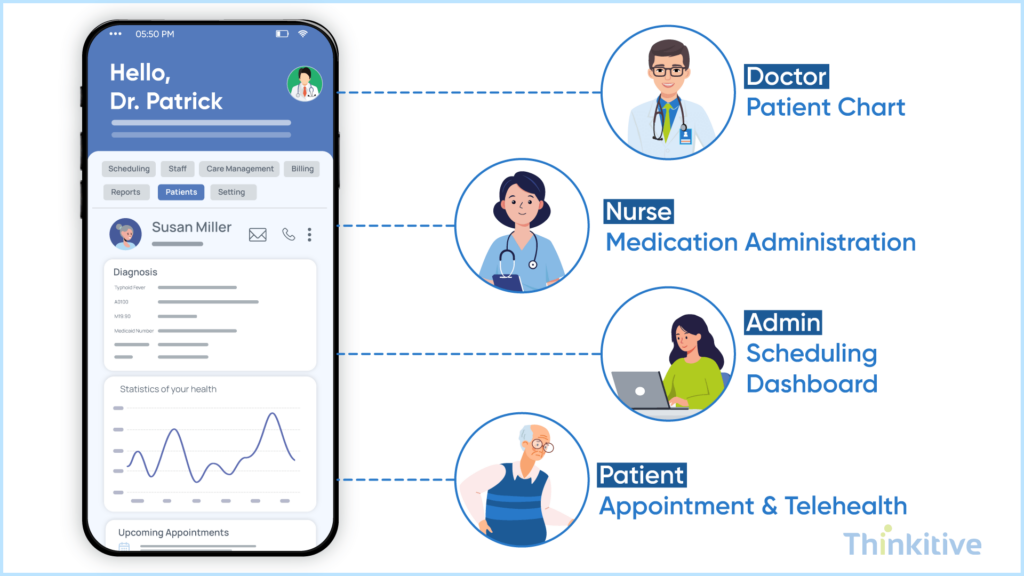
- Healthcare Providers: The major use cases of the mobile EHR app for healthcare providers are reviewing patient charts, documenting encounters, ePrescribing medications, placing lab orders, capturing images, accessing schedules, and communicating with care teams.
- Administrators: Administrators can use these mobile EHR apps for approving requests, monitoring schedules, reviewing reports, managing staff, and receiving operational alerts.
- Patients: Patients can use these mobile EHR apps for booking appointments, accessing medical records, messaging providers, attending telehealth visits, viewing prescriptions, completing forms, and paying bills.
NOTE: Not every user needs every feature. Build role-specific experiences instead of a one-size-fits-all application.
Once you know the use cases, building your mobile EHR app becomes a little easier. You see, by now your workflows are mapped, core functionalities are known, which helps you in defining the feature list of your EHR software.
Some of the common features that you must consider are:
- Secure login with multi-factor authentication
- Patient chart access
- Clinical documentation
- ePrescription
- Appointment scheduling
- Secure messaging
- Telehealth
- Push notifications
- Voice dictation or AI-powered documentation
- Medical image capture
- Clinical decision support
- Lab and pharmacy integrations
However, unlike desktop EHRs, mobile applications operate in situations that we cannot even expect. One of the major problems in this can be seen in providers switching from Wi-Fi and cellular networks, working from remote clinics, or accessing records during home visits.
On that note, here are some considerations that you must consider:
- Offline access with encrypted local storage
- Automatic synchronization when connectivity returns
- Biometric authentication using Face ID or fingerprint recognition
- Fast loading and responsive interfaces
- End-to-end encryption for data in transit and at rest
- Remote device wipe capabilities
- HIPAA-compliant data handling
- Audit logging and role-based access control
During this venture, you should keep a keen eye on not isolating your application. It will not only make things worse. In fact, you should plan and build your mobile EHR into your existing healthcare ecosystem.
For instance, your mobile app must connect with EHR backend services, patient databases, FHIR APIs, identity and authentication services, billing systems, laboratory systems, pharmacy networks, cloud infrastructure, etc. This architecture enables clinicians to access the same real-time patient information across desktops, tablets, and smartphones.
TIP: Design the backend as API-first so both your web and mobile applications can securely share the same business logic, clinical workflows, and patient data. This approach simplifies maintenance and ensures consistency across platforms.
Confused Between Developing Android or iOS Mobile EHR? Know Which Suits Your Practice Best –
Get Consultation
Choosing the Right Approach for iOS & Android Development
After defining your application requirements, the question that will take up your time will be, ‘Should I go for iOS EHR app development or Android EHR app development?’
The decision you make here will impact the development cost, timeline, maintenance, performance, and the overall user experience. And the choices you have are basically native development or cross-platform development. Now, this right option here will depend on your users, business objectives, budget, and long-term product strategy.
Native vs Cross-Platform Development for Healthcare Applications
Native development basically means building applications specific to one platform using platform-specific technologies like iOS and Android. This is typically used to deliver the best performance and seamless integrations with device features, but they are specific to that particular platform only.
Cross-platform development, on the other hand, uses a shared codebase to build applications that can work on both iOS and Android. It not only reduces development time and cost but also helps in maintaining a consistent user experience across devices.
Here is a quick comparison table to help me make better decisions:
| Factor | Native Development | Cross-Platform Development |
| Codebase | Separate for iOS & Android | Shared codebase |
| Development Cost | Higher | Lower |
| Time to Market | Longer | Faster |
| Performance | Excellent | Very Good |
| Device Integration | Full access | Good (most features supported) |
| Maintenance | Two codebases | Single codebase |
| Best For | Enterprise healthcare systems with complex requirements | Startups, clinics, MVPs, and organizations seeking faster deployment |
Key Considerations for iOS EHR App Development
If your user base mainly uses iOS devices, then here are some of the key considerations for your iOS EHR app development.
- Consistent hardware ecosystem
- Strong security features
- Face ID and Touch ID authentication
- Better performance optimization
- Higher adoption among many U.S. physicians and healthcare executives
- Apple Health integration
- Medical device compatibility
iOS development is often preferred when your primary users are clinicians working in hospitals or healthcare organizations that standardize on Apple devices.
Key Considerations for Android EHR App Development
If your user base uses Android devices, then something might be a little different from iOS. On that note, here are a few things that you must consider for Android EHR app development.
- Wider device availability
- Lower hardware costs
- Greater flexibility
- Support for rugged healthcare devices
- Easier deployment across diverse organizations
- Google Health Connect integration
- Scalability for global healthcare markets
Since Android runs on many different manufacturers and screen sizes, testing across multiple devices becomes especially important.
How to Choose the Right Development Approach
There is no right approach defined, and it cannot be defined alone with the help of technology. The right decision is always based on the core user group of your application, the devices these applications typically run on, and your budget.
Along with this, some other things on which your approach depends are regulatory requirements, expected growth, and long-term maintenance plans. On that note, here is our quick decision-making guide that you can follow:
| If your goal is… | Recommended Approach |
| Launch an MVP quickly | Cross-platform |
| Reduce development costs | Cross-platform |
| Build for both iOS and Android simultaneously | Cross-platform |
| Deliver the highest possible performance | Native |
| Deep integration with device hardware | Native |
| Support a large enterprise healthcare system | Native or Hybrid, depending on complexity |
| Reach the broadest user base | Cross-platform or both native apps |
React Native vs Flutter for EHR Mobile Apps
Assuming that your user groups are full of both iOS and Android users, you would choose a cross-platform approach for building your mobile EHR app. Now, the next decision that you need to make is choosing the right framework.
Some of the most popular choices to build iOS and Android applications are React Native and Flutter. However, the right choice depends entirely on your project’s complexity, team expertise, long-term maintenance strategy, and user experience expectations.
React Native vs Flutter: What’s the Difference
Let’s know the basic difference between React Native and Flutter, and know which one is better for you:
| Factor | React Native | Flutter |
| Programming Language | JavaScript / TypeScript | Dart |
| UI Rendering | Native UI Components | Custom Rendering Engine |
| Performance | Excellent | Excellent to Near-Native |
| Development Speed | Fast | Fast |
| Hot Reload | Yes | Yes |
| Learning Curve | Easier for JavaScript teams | Slightly steeper |
| Third-party Libraries | Very Mature | Growing rapidly |
| UI Consistency | Depends on platform | Highly consistent |
| Best For | Existing React teams and rapid development | Complex, UI-rich healthcare apps |
You should choose React Native for EHR development if your application is primarily patient-facing in nature. React Native can be the perfect choice for patient-facing portals, appointment management, telehealth platforms, care coordination, and mobile extensions for web-based EHR systems.
On the other hand, Flutter can be the perfect choice for mobile EHR development if you have complex dashboard requirements, medical imaging, rich clinical interfaces, offline-first functionality, and highly customized user experiences.
But if you are still confused about which framework to choose, then you can use the following table for better decision-making:
| If your priority is… | Recommended Framework |
| Faster MVP development | React Native |
| Existing React expertise | React Native |
| Reusing web developers | React Native |
| Rich UI and animations | Flutter |
| Consistent interface across devices | Flutter |
| Highly customized clinical workflows | Flutter |
| Large enterprise healthcare product | Either, depending on architecture |
Building HIPAA-Compliant Mobile EHR Applications
You might be building your mobile EHR application for ease of use and to offer a better experience to the users. In this quest, you should not skip or miss out on the security aspect of your data at every stage.
Since mobile devices are frequently used outside the typical care setting, your security is always at risk for device theft, unsecured networks, and unauthorized access. HIPAA compliance should be built into the application architecture from the very beginning, rather than added as a final step before deployment.
Some of the security measures that you must take are:
| Security Area | Best Practices |
| Authentication | Multi-factor authentication (MFA), Face ID/Touch ID, strong password policies |
| Access Control | Role-based access control (RBAC), least-privilege access, automatic session timeout |
| Data Protection | Encrypt PHI both at rest and in transit, secure APIs using HTTPS/TLS |
| Device Security | Remote device wipe, jailbreak/root detection, secure local storage |
| Monitoring & Auditing | Audit logs, activity monitoring, regular security assessments |
There can be some core implementation differences between iOS and Android, like in iOS, you will likely use Face ID, Touch ID, Keychain, and Secure Enclave, whereas on Android, you would use Biometric Authentication, Android Keystore, encrypted storage, etc.
Now, even though there is a difference in the operating systems, the compliance objectives of your HIPAA-compliant mobile EHR still remain the same to protect patient data, prevent unauthorized access, and maintain complete auditability.
Apart from implementing technical safeguards, following a few development best practices can significantly simplify HIPAA compliance throughout the application lifecycle.
Here are some best practices that you can follow for HIPAA-compliant mobile EHR apps:
- Encrypt PHI at rest and in transit.
- Enable multi-factor and biometric authentication.
- Implement role-based access controls (RBAC).
- Minimize local PHI storage and securely sync data.
- Maintain audit logs for user activity.
- Perform regular security testing and HIPAA risk assessments.
- Keep SDKs, libraries, and dependencies up to date.
HIPAA compliance isn’t achieved by adding security features at the end of development. It should influence every stage of your mobile EHR project—from architecture and API design to testing, deployment, and ongoing maintenance.
See How Security Functions in Mobile EHR –
Watch DemoMobile Architecture, Interoperability & Offline Access
A mobile EHR app should function as an extension of your existing EHR system on the computer to your phone. Now, whether you’re building for iOS, Android, or both, the app should securely connect with your backend through APIs to provide real-time access to records, appointments, documentations, results, etc.
Here are the interoperability standards that you must adopt:
| Standard | Purpose |
| FHIR | Exchange healthcare data through APIs |
| HL7 | Enable communication between healthcare systems |
| SMART on FHIR | Integrate applications with EHR platforms |
Now, since you might also have to work in environments with limited connectivity, your mobile EHR should also be able to support offline functionality. This must include encrypted local storage, automatic data synchronization once the connection is restored, and conflict resolution to maintain data consistency.
A scalable architecture with secure APIs, FHIR interoperability, and reliable offline synchronization contributes far more to a successful mobile EHR than the choice of development framework alone.
How to Build a Mobile EHR App Successfully
Building a successful mobile EHR app requires more than just selecting the right EHR tech stack. It starts with the understanding of clinical workflows and ends with rigorous testing to ensure the application is secure, scalable, and compliant.
Here is a quick overview of some of the major steps in EHR mobile app development:
| Step | What to Do |
| 1. Define Requirements | Identify your target users, map clinical workflows, and prioritize features based on provider, administrator, and patient needs. |
| 2. Choose the Right Technology Stack | Select the appropriate platform (native or cross-platform), frameworks, backend technologies, cloud infrastructure, and interoperability standards. |
| 3. Build & Integrate | Develop the application with secure APIs, scalable architecture, and integrations for EHRs, laboratories, pharmacies, and other healthcare systems using standards like FHIR. |
| 4. Test Thoroughly | Validate security, performance, usability, offline functionality, interoperability, and HIPAA compliance across iOS and Android devices. |
| 5. Launch & Optimize | Deploy the application, monitor performance, collect user feedback, and continuously release updates and security improvements. |
Some of the commonly committed mistakes that you must avoid are:
- Trying to replicate the entire desktop EHR on mobile.
- Ignoring offline access and synchronization.
- Overlooking interoperability requirements.
- Treating HIPAA compliance as an afterthought.
- Failing to test across multiple devices and screen sizes.
Remember, the best mobile EHR apps are built around clinical workflows and not what technology you know best. Always prioritize usability, security, and interoperability that clinicians will actually adopt.
Conclusion
If you have made it this far, then you can at least talk to your EHR vendor freely and explain to them what you actually expect from this mobile EHR app. On that note, let this blog be your guide to building a mobile EHR app and knowing the intricacies that are involved in this.
Also, no matter what development approach you choose, Android EHR app development, iOS EHR app development, or cross-platform EHR app development, remember to also prioritize security, usability, and interoperability.
Along with that, choose the right technology stack and architecture approach after thoroughly discussing it with your vendor. And if you don’t know about your system, then talk with our EHR expert and see how to develop an EHR with a mobile EHR app for your practice.
Frequently Asked Questions
To build mobile EHR app solutions successfully, organizations should first identify user requirements, map clinical workflows, and define essential features. The next steps include selecting the right EHR tech stack, implementing secure APIs, enabling FHIR interoperability, ensuring HIPAA compliance, and thoroughly testing the application for performance, security, and usability before deployment.
A modern mobile EHR application should include secure login with multi-factor authentication, patient chart access, clinical documentation, ePrescribing, appointment scheduling, telehealth, secure messaging, push notifications, offline access, AI-powered documentation, and seamless integration with laboratory, pharmacy, and billing systems.
For iOS EHR app development, organizations should focus on user experience, device compatibility, security features such as Face ID and Keychain, seamless integration with Apple Health where required, and HIPAA-compliant data protection. The choice between native and cross-platform development should also align with long-term business goals and maintenance requirements.
Successful Android EHR app development requires support for a wide range of devices and screen sizes, secure authentication, encrypted local storage, offline functionality, API-based integrations, and compatibility with Android security features such as Biometric Authentication and Android Keystore. Extensive device testing is also essential to ensure consistent performance.
The choice between React Native vs Flutter for EHR mobile apps depends on your project requirements. React Native is well-suited for organizations with existing React expertise and projects requiring faster development, while Flutter offers highly consistent UI, excellent performance, and greater flexibility for complex healthcare applications. Both frameworks are capable of supporting enterprise-grade mobile EHR solutions.
Some of the best practices for HIPAA-compliant mobile EHR apps include encrypting patient data at rest and in transit, implementing multi-factor authentication, using role-based access controls, maintaining audit logs, minimizing local storage of protected health information (PHI), securing APIs, and conducting regular security testing and HIPAA risk assessments.
If you’re wondering how to build a mobile EHR app for iOS and Android successfully, begin by defining user requirements and clinical workflows, choosing the appropriate development approach (native or cross-platform), selecting a scalable EHR tech stack, implementing secure integrations using FHIR APIs, ensuring HIPAA compliance, and performing comprehensive testing before deployment.
Mobile EHR apps support interoperability by using standards such as FHIR, HL7, and SMART on FHIR to exchange healthcare data securely between systems. This allows providers to access real-time patient records, lab results, prescriptions, appointments, and clinical documentation from any authorized device while maintaining data consistency across the healthcare ecosystem.
The decision depends on business objectives, budget, timeline, and user requirements. Native development is ideal for applications requiring maximum performance and deep device integration, while cross-platform development offers faster development, lower maintenance costs, and a shared codebase for both iOS and Android. Organizations should choose the approach that best aligns with their long-term product strategy and clinical workflows.


