EMR Application Development: Building Mobile-First Solutions for Modern Healthcare

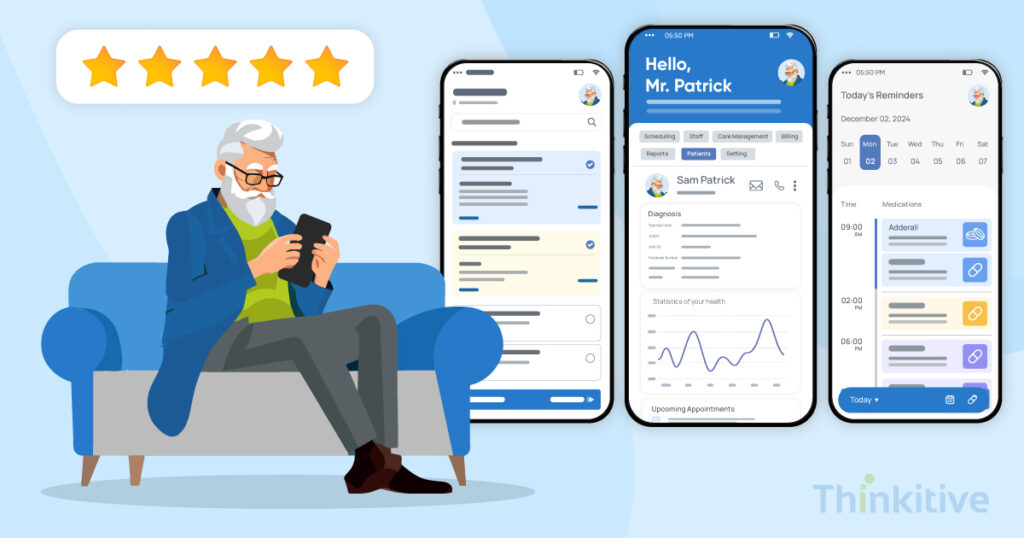
According to the Pew Research Center, around 91% of U.S. adults own a smartphone. Now, have a look at this, out of these 91%, nearly two-thirds of the adults, nearly 63% have used a mobile app for a health-related purpose in the past year.
So, if I say we spend most of our time on mobile phones, most of you will agree with me. Furthermore, a study by Exploding Topics said that on average, an individual spends 4 hours 58 minutes on their phone daily. However, this usage is for everything from banking to grocery shopping.
And interestingly, healthcare has somehow found itself in the midst of this transition. You see, given the convenience factor with mobile in accessing things, it has resulted in healthcare app development on a larger scale. And EMR systems find themselves at the center of care delivery and practice management, mobile-first EMR development makes sense, right?
This shift is because of the inefficiencies of traditional EMR software, as providing this convenience is not that easy. You see, when you adapt the EMR built for desktop to mobile, it performs, but not smoothly. It lags and hinders efficiency, affecting user satisfaction levels.
That’s why only adapting the EMR software to mobile is not the solution. You need to develop a mobile-first EMR that not only provides convenience but also efficiency. And that’s where EMR software development steps in.
With the right development strategies, these solutions transform the everyday care experience for both patients and providers. Patients enjoy convenience, and providers get the freedom to leave their desks.
Imagine a physician updating patient data while sitting at their homes on sofas, rather than staying up late on their office desks. Even patients get the convenience and reach they crave, as they can easily check on their lab results, check care plans, and connect with care teams in seconds.
In this blog, we’ll explore what it takes to build EMR software that works seamlessly on phones and tablets, and how it differs from traditional, desktop-focused systems.
Let’s get started!
Understanding Mobile-First Design in the Healthcare Context
When it comes to healthcare apps, many think that mobile-first and mobile-responsive are the same approach. However, this is far from reality. When we say mobile-responsive, it means an EMR software that works for desktops and only responds to mobile devices, and it does not work seamlessly. Meanwhile, mobile-first is a completely different thing as it is designed for phones and not just for responding. It changes everything from usability, load times, clean layouts, etc.
Major benefits of mobile-first design in EMR systems can be directly felt in the performance of the system for clinical settings. For instance, data sharing is much smoother across devices, and since it requires different workflow assumptions than responsive EMR, the software feels less intricate and refined for usage.
However, the design needs to be enhanced every now and then based on the usage and usage trends and patterns of your staff. One of the best ways to deal with this is by implementing progressive enhancement strategies.
Healthcare-Specific Mobile Requirements
Healthcare environments require some customization that most industries don’t face. A mobile-first EMR must:
- Support one-handed operations, especially for bedside use.
- Offer offline access when connectivity is not good.
- Provide quick access to critical patient data without unnecessary navigation.
- Include voice or gesture controls for sterile or hands-free environments.
User Research and Personas
This is a crucial thing that you must not overlook, as without proper user research, building user-friendly mobile EMR solutions is not possible. So, understand what your clinicians need. For instance, physicians need to update notes quickly, and nurses rely on fast, intuitive documentation tools. As for administrative staff and patients, portals that make their routine work in scheduling and billing easier are the selling point. Mapping this all well is important to develop a successful custom EMR solution that fits mobile.
Design System Foundations
Alongside a robust tech, user-based app, having a design that is easy to understand and navigate through is also essential. Touch-friendly interface elements, healthcare-specific UI components, and accessibility standards (WCAG 2.1) make the app usable across diverse patient and provider populations.
In short, mobile-first design in healthcare isn’t just about making apps work on smaller screens; it’s about developing healthcare digital tools that perfectly fit the demanding pace and precision of modern care.
Another approach that you can adopt for the design phase of your custom EMR application development for iOS and Android is designing with clinician-first UI/UX principles. This helps in increasing the usability of the application by minimizing taps, reducing cognitive load, and avoiding screen clutter.
On top of that, by introducing AI-driven predictive UI into your EMR system architecture, the application can itself suggest relevant patient data based on the clinical notes, user role, appointment scheduling, and location.
Technical Architecture for Mobile EMR Applications
No matter how great your idea of a mobile-first EMR development is, if the choice of tech stack goes wrong, then everything will be merely hanging by a thread. This is especially true with patient portal development, as they must deliver speed, reliability, and robust security in a single application.
Depending on the two core aspects of EMR software development, here is how the tech stack for your software system can look, with options, to help you analyze the strengths and weaknesses of each one:
| Category | Options | Strengths | Best Use Case |
| Frontend | React Native | Faster deployment, large ecosystem | Clinics needing a quick rollout across iOS/Android |
| Flutter | Consistent UI/UX, strong performance | Patient-facing portals with a uniform design | |
| Native iOS/Android | Maximum performance, full device feature access | Imaging-heavy or high-security clinical apps | |
| Progressive Web App (PWA) | Lightweight, browser-based | Basic access portals with limited offline use | |
| Backend | REST APIs | Simple, widely supported | EMRs with predictable data queries |
| GraphQL | Efficient queries, smaller payloads | Large datasets with varied access patterns | |
| Microservices | Modular, scalable | Systems needing rapid feature updates |
Custom EMR application development, especially with mobile-first design, using native design standards, can prove to be the first step in the right direction for mobile-first EMR development. Furthermore, design a mobile-optimized backend so that data retrieval in your healthcare application is faster and gives you a competitive edge in delivering faster care.
Having said that, while frontend and backend set the foundation, healthcare apps need to be secure to protect sensitive patient data. You also can’t forget the performance part, as it impacts user adoption.
| Category | Options | Strengths | Best Use Case |
| Security | Biometric Auth | Strong identity verification | Physician/nurse logins on shared devices |
| MDM Integration | Remote device control | Enterprise hospital rollouts | |
| Certificate Pinning | Prevents API tampering | Apps with sensitive data exchanges | |
| Performance | Lazy Loading | Faster startup | Clinical apps with heavy data libraries |
| Background Sync | Offline changes auto-updated | Home health and RPM workflows | |
| Battery Optimization | Reduced drain during long shifts | Mobile use in hospital rounds | |
| AI-Assisted Prioritization | Reduced cognitive load and faster task completion | Clinician dashboards and mobile task management | |
| On-Device AI (Edge Computing) | Low-latency voice processing and image analysis | Voice dictation, wound imaging, and bedside documentation |
So, the key takeaway here is that a mobile EMR must be clinically reliable, secure, and efficient, ready for the harsh and fast healthcare environments. And the talks of security can simply be incomplete without mentioning HIPAA compliance. Being such a major requirement of EMR software development, align the security architecture of your software with that of the HIPAA rules and regulations. This will not only help in HIPAA-compliant app development but also allow you to seamlessly navigate through the changing landscape.
Want to Build the App with the Right Architecture? Download Our Mobile EMR Architecture Blueprint & Security Checklist
Download NowEssential Features for Mobile-First EMR Applications
A mobile-first EMR development isn’t just about shrinking a desktop system to fit a phone screen. It needs features designed for fast, intuitive use in clinical settings, where seconds can make a difference. Here are the must-haves that define modern mobile EMRs.
Clinical Documentation
Efficient documentation is the backbone of any EMR. Customizable EMR Mobile apps must support:
- Voice-to-text with medical terminology for hands-free charting.
- Smart templates and quick phrases that reduce repetitive typing.
- Extras like photo capture or drawing tools for wound care and anatomical notes.
- AI-powered ambient documentation processes that auto-populate EMR fields and reduce pajama time of providers.
Patient Care Coordination
Care doesn’t happen in silos, and mobile apps should reflect that. Key features include:
- Real-time team messaging and task handoffs for smooth transitions.
- Medication records with integrated alerts, ensuring safe administration.
- A unified notification system that keeps everyone updated.
Clinical Decision Support
On-the-go decision-making needs built-in intelligence. Mobile-first EMRs should provide:
- Drug interaction checks to prevent prescribing errors.
- Point-of-care guidelines and evidence-based order sets for safer care.
- Optional AI-powered suggestions that assist but don’t overwhelm clinicians.
AI powered CDSS tools can be of great use, especially when integrated into EMR mobile applications. You see, for time-sensitive clinical scenarios, delivering appropriate care at the right time can be initiated with this.
Workflow Integration
The best apps fit seamlessly into daily routines. Essential capabilities include:
- Barcode scanning for quick and accurate patient identification.
- E-prescribing that saves time and reduces errors.
- Lab results and schedule updates are delivered instantly to the device.
By combining these features, mobile-first EMRs don’t just replicate desktop systems—they empower clinicians and patients with tools that improve care, speed, and safety at every touchpoint.
Integrated Patient Portals
Patient portal development is something that you have to do, as it acts as the point of contact for patients. It becomes even more necessary in mobile-first EMR software, as it is the funnel that defines a patient’s care journey. One of the core features in this is enabling patients to upload data via mobile phone or sensors, directly into their EMR via a mobile EMR app.
Furthermore, it also helps in improving clinician and patient data continuity through mobile-first portals, as the gaps between convenience and accessing care delivery get blurred.
Compliance & Security for Mobile Healthcare Apps
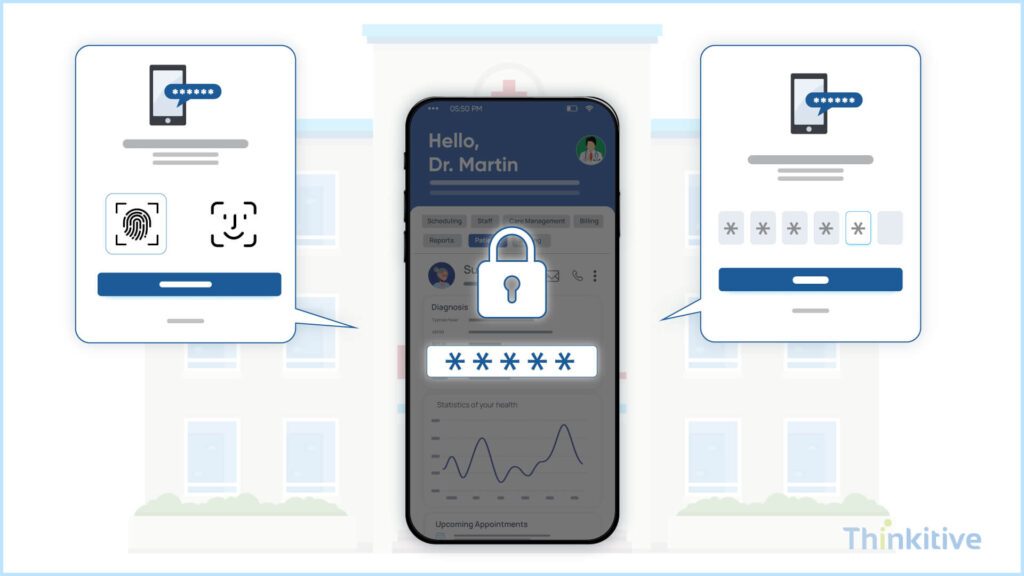
Mobile healthcare apps must balance ease of use with strict compliance. HIPAA standards apply just as much on smartphones as in hospitals, meaning features like automatic logoff, remote wipe for lost devices, and PHI encryption are non-negotiable. Access logs and audit trails also ensure accountability across users.
Some of the core features of requirements for HIPAA-compliant app development are automatic logoff implementation and the capability to remotely wipe. Furthermore, the access and monitoring of patient health conditions must also be included. However, PHI encryption standards must be applied so that your data is always protected. Last but not least, you need to apply HIPAA-compliant app development strategies for handheld clinical devices, given their complexity.
- Mobile-Specific Security Threats
Phones and tablets introduce risks that desktops don’t, such as jailbroken devices, insecure Wi-Fi, or app tampering. Robust security should include root detection, man-in-the-middle attack prevention, and secure communication between apps handling sensitive data.
- Authentication Methods
Strong authentication prevents unauthorized access. Multi-factor authentication and biometric options like Face ID or Touch ID improve security without slowing workflows. Single sign-on (SSO) further simplifies access, while session management closes lingering logins.
- Data Protection Strategies
Finally, data security must extend beyond encryption. Apps should use secure key storage, restrict copy-paste or screenshots for PHI, and apply application-level protections to block unauthorized data sharing. These safeguards might run quietly in the background, but they are essential for maintaining patient trust and avoiding compliance pitfalls.
Get our Mobile Healthcare App HIPAA Compliance Toolkit
Download NowOffline Functionality & Data Synchronization
The advantage you can give your providers with mobile-first EMR development is that of offline functionality and data synchronization options. These are some of the core features that allow providers to continue to deliver care even without an internet connection, at least for the time being.
On that note, here are a few things that you need to consider in this:
- Offline Architecture Design
The very first thing that you need to do in this is to build an offline architecture design for your EMR software. In this, you first have to choose a local database selection; SQLite and Realm are some of the options that you can explore.
Also, in an unstable internet environment, you need to apply smart rules to determine how data conflicts are handled when the device reconnects with the system. Having a conflict resolution strategy helps in preventing overwrites and ensures clinical data integrity.
Furthermore, the offline functionality will only work when the data collected is synchronized with other devices when connected back to the internet. For this, a queue management strategy must be implemented for pending changes. You see, offline changes are securely queued for processing, and once the device connects back to the internet, they are automatically updated in the system, so that no updates are lost.
For this, automatic synchronization can be extremely useful as it allows for seamless data flow.
- Critical Offline Features
Talking about offline features, here are some critical features that must be present in your mobile EMR for usability. First things first, it should be able to document patient demographics and other data, such as allergies, directly into the system.
Other than that, with patient portal development, the patient or provider must be able to view recent lab results and vitals collected by the patient, even in offline mode. This can speed up the care delivery factor and prove crucial in maintaining continuity.
Some of the other major features that are critical in this are medication lists for prescriptions and orders, so that your entire EMR application acts like an MVP product, to give you better usability.
- Sync Strategy Implementation
Once connectivity returns, the system must sync efficiently. Delta synchronization, transmitting only the changes rather than the entire dataset, saves bandwidth and time. Prioritized sync queues ensure critical patient data, like medication orders, are updated before less urgent records. Background sync scheduling and smart network detection further enhance usability without draining the device battery.
- Data Integrity Measures
Editing offline carries a certain risk of data duplication or error, so there must be some measures to ensure it does not happen. The app must have version control and audit trails to help in tracking who made changes and what the changes are. If conflicts occur, users should be notified instead of silently overwriting data. For more safety, rollback mechanisms act as a safety net, ensuring no critical data is permanently lost.
Implementation Roadmap & Best Practices
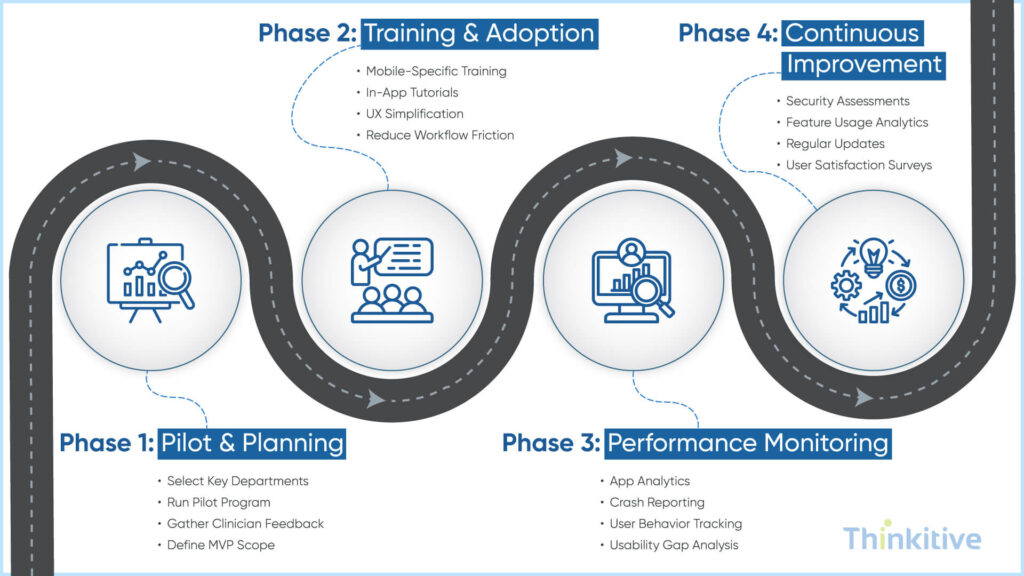
If you have made it this far, then you know how to build a mobile-first EMR application; however, to speed up the process and build an application that actually meets your needs, here is a quick implementation roadmap with some best practices to help you in the process:
- Phased Rollout Strategy: This is one of the widely adopted strategies today, where, rather than releasing the entire system in one go, first a pilot program is selected for the most important departments of your practice. Then you finalize the features, take user feedback for integrations, and then release a Minimum Viable Product. This will allow you to perform your day-to-day tasks while new features get added gradually.
- Training & Adoption: The mobile EMR application will only make a difference when it can be used effectively by the providers. Develop mobile-specific training modules for initial training. Moreover, for complex features, provide in-app tutorials and tooltips, so that everyone has a guide on how to use the app. An important thing to note in this is that clinical adoption is directly related to intuitive mobile UX, so focus on training to reduce interaction friction.
- Performance Monitoring: The mobile app you’ll be developing will not be the ideal one at the very start. Given its userbase, you need to monitor its performance and make changes as per the gaps it leaves behind. Some of the best practices for this are the implementation of app analytics, where you get to know about every small thing happening in the app. Then, integrate a crash reporting system, so that in case of any crash, you get immediately informed. Furthermore, to improve usability, track user behavior across the system, identify gaps, and make changes to enhance the application.
- Continuous Improvement: As mentioned earlier, EMR software enhancement is a continuous process. In this, you need to conduct regular security assessments to identify gaps and address them. Also, with respect to the features, get feature usage analytics, so that you know the intricacies of the features and how they are impacting care or administrative functionality of the practice. Also, have an application update and maintenance cycle so that you can make the necessary changes in the system at timely intervals. However, prior to this, you need to conduct user satisfaction surveys so that your users get a delightful experience while using the application.
Conclusion
Mobile EMR solutions are quickly becoming a timesaver and efficiency booster for healthcare providers. They can do patient charting, connect with patients, and continue working even if the internet connectivity is disrupted.
Moreover, the mobile-first development approach is further making these apps better and faster to match the modern healthcare pace. So, if you haven’t developed your customizable EMR for mobile, then we at Thinkitive can help you develop apps that suit your workflows and needs effortlessly.
Contact us to get the initial assessment and quote for the development of a custom mobile EMR solution.
Frequently Asked Questions
Mobile-first EMR development means designing the EMR application for smartphones and tablets before scaling up to desktops—rather than shrinking a desktop EMR to fit smaller screens. Traditional EMR design prioritizes large monitors, mouse clicks, and complex workflows, while mobile-first focuses on touch interactions, speed, and real-world clinical mobility.
This approach enables faster access to patient data, intuitive navigation, and real-time documentation—key benefits of mobile-first design in EMR systems that directly support modern clinical workflows.
Mobile-first EMR application development allows clinicians to document care at the point of care—during rounds, bedside visits, or remote consultations. Features like voice input, smart templates, and one-tap actions reduce typing and context switching.
As a result, EMR software development aligned with mobile-first principles significantly cuts documentation time, reduces after-hours charting (“pajama time”), and improves overall clinician productivity—making it a core advantage of modern healthcare app development.
When planning custom EMR application development for iOS and Android, key technical considerations include:
- Native or cross-platform architecture for performance and scalability
- Offline-first data access with secure sync mechanisms
- API-driven integration with core EMR systems and third-party tools
- Optimized UI/UX for small screens and clinical environments
- Device-level security (biometrics, secure storage, session controls)
These decisions play a major role in how to build a mobile-first EMR application that is reliable, fast, and clinician-friendly.
AI-powered features elevate mobile EMRs by reducing manual effort. Ambient documentation uses voice recognition and NLP to automatically capture clinical conversations, while predictive UI anticipates next actions—such as orders, diagnoses, or templates—based on context.
When integrated into mobile-first EMR development, these AI capabilities streamline workflows, minimize clicks, and dramatically enhance usability—setting a new standard for intelligent EMR software development.
Ensuring HIPAA-compliant app development requires embedding security and compliance into every phase of the development lifecycle. This includes:
- End-to-end encryption for data at rest and in transit
- Role-based access controls and audit logs
- Secure authentication and session management
- Vendor compliance and Business Associate Agreements (BAAs)
For mobile EMRs, compliance must extend across devices, networks, and cloud infrastructure—making it a foundational pillar of responsible healthcare app development.
Critical security strategies for mobile EMR applications include:
- Secure APIs and token-based authentication
- Mobile device management (MDM) and remote wipe capabilities
- Regular penetration testing and vulnerability assessments
- Encrypted patient portal development for patient-facing access
- Continuous monitoring and compliance reporting
These safeguards ensure patient data protection while supporting scalable, secure EMR software development in mobile-first environments.


