Epic EHR Integration: Complete Guide to Epic API & FHIR Connectivity

Epic Systems is clearly one of the major giants of healthcare IT, with a huge market of 43.7%, which is by far the highest market share in healthcare IT, according to Becker’s Hospital Review.
Moreover, by extending its support to nearly 57% of hospital beds, Epic interoperability has today become a core requirement for healthcare practices wanting to be a part of the connected digital health ecosystem.
Furthermore, with the 21st Century Cures Act and the ONC (g)10 regulation pushing the healthcare industry towards standardized, API-based data access through FHIR, Epic EHR integration has become a major milestone for many practices. And the reason why Epic integration is so important for healthcare practice is that it holds the data of almost 305+ million patients, according to several sources.
Having said that, with many practices making a strategic shift from legacy HL7 interfaces to API-first healthcare connectivity, the question, ‘How to integrate with Epic EHR using FHIR?’ is quite popular for providers.
On that note, in this blog, let’s discuss the intricacies of Epic EHR integration and let this blog be your guide to navigate Epic APIs, FHIR connectivity, and App market integrations for achieving EHR interoperability.
So, without further ado, let’s get started!
Assess Your System for Epic EHR Integration –
Get Free Assessment
Navigating the Epic Developer Portal & Sandbox
To successfully integrate your system with Epic Systems, it is crucial that you understand Epic’s developer ecosystem, onboarding workflows, and sandbox testing environment.
As a developer integrating with Epic systems, they can easily access Epic FHIR API documentation, SMART on FHIR specifications, OAuth workflows, and integration guides through the Epic developer portal and App Orchard ecosystem.
Now the Epic API onboarding process typically includes the following:
- Developer Registration
- Application Configuration
- SMART on FHIR setup
- OAuth Credential Generation
- Sandbox Access
- Interoperability Testing
- Production approval
Now, practices use Epic sandbox environments to validate workflows securely before deploying integrations in live clinical environments.
Talking about sandboxes, these sandboxes contain synthetic patient datasets that mimic the real-world healthcare data without exposing actual patient information. This is crucial for healthcare practices to maintain HIPAA compliance during both the development and testing of the integration.
Moreover, sandbox testing is especially useful for validating the following things:
- FHIR resource mapping
- SMART on FHIR authentication
- Patient-context launches
- API permissions
- Interoperability workflows
- Error handling scenarios
By using Epic’s sandbox and validation environment effectively, you can reduce the Epic SMART on FHIR implementation risk by a huge margin. On top of that, it improves the reliability of its interoperability and accelerates production-ready Epic EHR integrations.
Core Connectivity: Epic FHIR API & SMART on FHIR
Remember, we talked about the regulations about the 21st Century Cures Act and ONC (g)10?
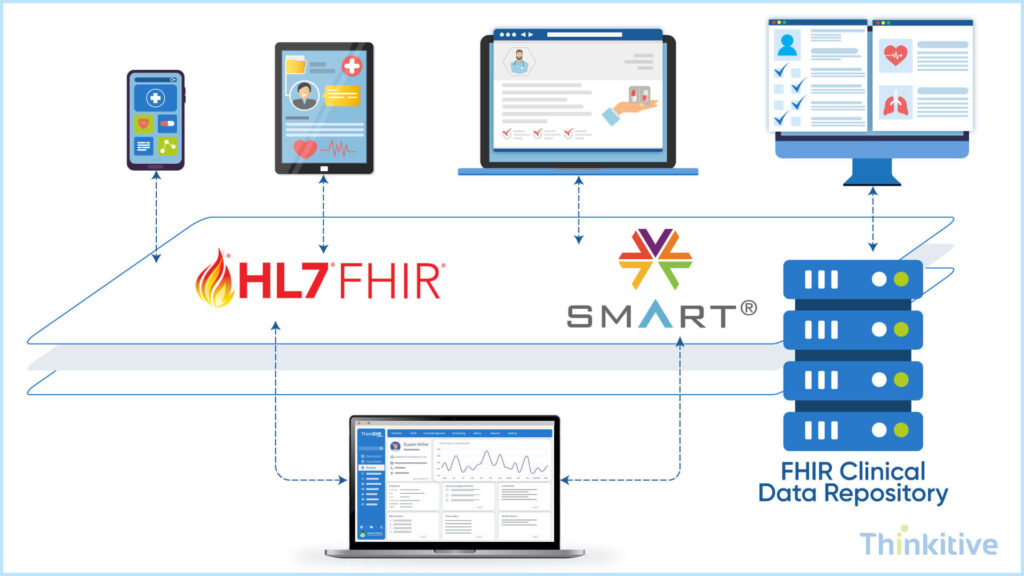
Well, these are the two factors that primarily drive the Epic interoperability by Epic FHIR APIs and SMART on FHIR frameworks. Moreover, these two connectivity frameworks have become the core pillars of integration lately. On top of that, these frameworks enable providers to build secure, scalable, and standardized healthcare integrations.
So, with the support of FHIR APIs and SMART on FHIR, Epic’s ecosystem supports interoperability for your practice across clinical, administrative, and patient engagement workflows through standardized RESTful APIs.
All Epic environments commonly support both FHIR R4 and DSTU2 standards, which allows healthcare applications to exchange structured clinical data. Some of the examples of this structured clinical data are:
- Patient demographics
- Encounters
- Medications
- Allergies
- Observation and notes
- Diagnostic reports
- Appointments
- Care plans
If you are looking for an interoperability standard for Epic EHR integration, then FHIR R4 is suggested to have a much broader industry adoption and improve support for modern healthcare workflows.
SMART on FHIR, on the other hand, further extends your system connectivity with Epic. In fact, it even allows third-party applications to launch securely within Epic Hyperspace using OAuth 2.0 authentication. Due to this, clinicians can easily access external applications directly inside their EHR while maintaining contextual patient access and role-based security controls.
In general, Epic integration supports two major access models:
- User-facing Scopes: Where applications operate on behalf of clinicians or staff members.
- System-to-system Scope: Where backend applications exchange healthcare data securely without direct user interaction.
Knowing this scope is important to maintain secure healthcare interoperability with other systems while supporting critical workflows such as:
- Patient engagement platforms
- Remote patient monitoring
- AI clinical assistants
- Care coordination systems
- Revenue cycle automation
- Clinical decision support tools
Now, if you are looking to integrate your system with Epic EHR using FHIR standards, then you must configure SMART authentication workflows, define API scopes, map FHIR resources, validate interoperability logic, and test workflows within the Epic sandbox environments before deploying for real-world use.
Modern Epic API integration ecosystem supports advanced interoperability capabilities, which include write-back workflows, embedded SMART applications, and real-time clinical decision support integrations.
Know the Best Approach for Epic EHR Integration –
Get Free ConsultationStrategic Paths for Epic EHR Integration with Third-Party Applications
When integrating with Epic Systems, you basically get two options: Open Epic APIs and the Epic App Orchard ecosystem. However, this choice clearly depends on their integration goals. To give you a sneak peek into these choices that you have, Open Epic mainly provides access to public interoperability resources such as FHIR APIs, SMART on FHIR documentation, and sandbox environments for standardized healthcare data exchange and testing.
On the other hand, Epic App Orchard supports more advanced and commercially deployable integrations that work deeply within Epic workflows. Now, while public APIs are generally used as foundational interoperability, commercial integrations often require App Orchard participation, security reviews, production validation, and ongoing governance for enterprise-scale deployments.
Confusing right? Well, refer to this comparison table of Open Epic vs Epic App Market, to help you understand them better and make better decisions:
| Feature | Open Epic | Epic App Orchard |
| Access Level | Public APIs and interoperability resources | Advanced and commercial-grade integrations |
| Cost | Lower implementation cost | Higher cost with commercial onboarding requirements |
| Approval Process | Standard developer onboarding | Rigorous security and validation review process |
| Best For | MVPs, startups, and basic interoperability | Enterprise-scale deployments and production integrations |
If you want to integrate third-party healthcare applications with Epic Systems, then these applications must consider interoperability standards, security requirements, FHIR resource mapping, SMART on FHIR authentication, and workflow compatibility before deployment. Along with that, proper testing and sandbox validation are also essential for ensuring reliable healthcare data exchange.
Additionally, enterprise Epic integration often involves organization-specific workflows, governance policies, compliance reviews, and approval processes. Managing these requirements effectively is critical for building scalable, secure, and production-ready interoperability solutions.
Security, Authentication & Deployment
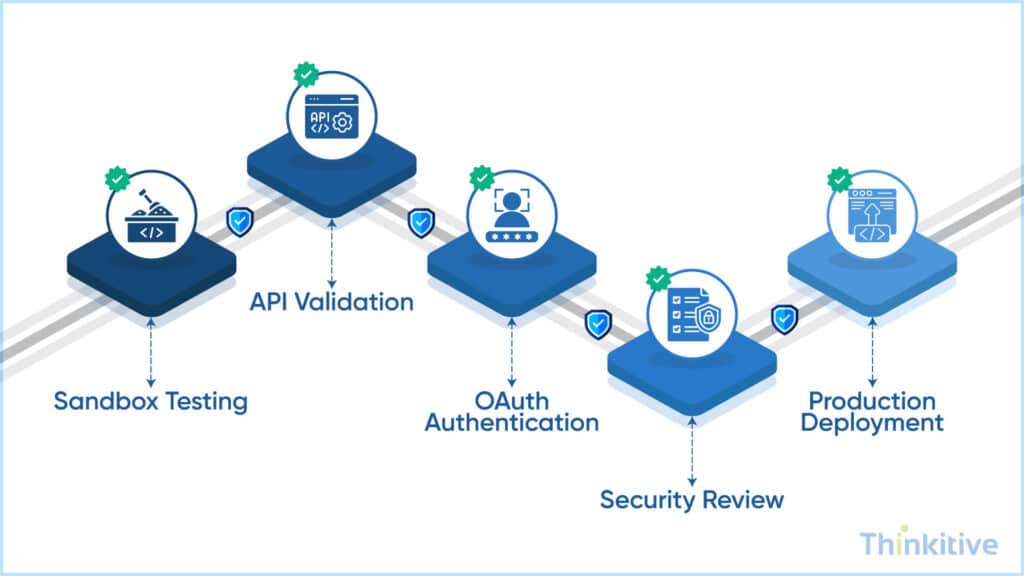
Another foundational component of Epic EHR integration is security. Most Epic interoperability workflows rely on OAuth 2.0 and SMART App Launch protocols to authenticate users securely and control access to clinical data.
These frameworks help healthcare organizations maintain secure, standards-based interoperability that supports patient-context and clinician-context applications launched inside the Epic environment.
Furthermore, if you are integrating your system with Epic, then you must also manage JWT tokens, API credentials, access scopes, and session security carefully to protect sensitive healthcare information and comply with HIPAA regulations.
On top of that, before Epic EHR integration goes live, they must undergo Epic security validation, interoperability testing, and organizational review processes to ensure compliance with enterprise healthcare standards.
Last but not least, Epic implementations can vary significantly across healthcare systems. You see, different organizations may use customized workflows, API configurations, access policies, and interoperability rules, requiring integration teams to adapt deployments accordingly.
Continuous monitoring is also essential for identifying API failures, workflow disruptions, and data latency issues that may impact real-time healthcare interoperability and clinical decision-making.
Do You Really Need EPIC EHR Integration –
Learn MoreConclusion: Scaling Epic Interoperability for Enterprise Healthcare
If you have been following this blog from the start, then you know the ecosystem that Epic Systems has built since its inception. And given that they handle the data of more than 305+ million patients, Epic interoperability still remains at the center of the enterprise healthcare ecosystem.
Moreover, it is important to have a governance-aware and scalable integration architecture that you can get with Epic EHR integration. As the landscape further evolves with the arrival of newer technologies, the role of TEFCA, FHIR, and SMART standards will be the key to being a part of this connected ecosystem.
Also, you know the complete guide about EHR vendor integration. Read this detailed blog here – EHR Vendor Integration: How to Choose the Right Approach by System.
On that note, consult with our integration expert and see your system’s readiness with Epic EHR integration and what would be the right approach to successfully integrating your system with Epic Systems.
Frequently Asked Questions
To start an Epic Systems integration, healthcare organizations and software vendors typically begin by registering through the Epic developer portal or App Orchard ecosystem. The process usually involves accessing Epic FHIR API documentation, configuring SMART on FHIR authentication workflows, setting up sandbox environments, and validating interoperability using synthetic patient datasets. Before production deployment, organizations must also complete security reviews, interoperability testing, and API approval processes.
Open Epic primarily provides access to public interoperability resources such as FHIR APIs, SMART on FHIR documentation, and testing environments for standardized healthcare data exchange. In contrast, the Epic App Market (App Orchard) supports more advanced and commercially deployable integrations that work deeply within Epic workflows. Enterprise-scale Epic API integration projects often require App Orchard participation, governance reviews, and production validation.
The Epic FHIR API enables healthcare applications to exchange structured clinical data securely using standardized RESTful APIs. Through Epic interoperability frameworks, applications can access patient demographics, encounters, medications, allergies, observations, diagnostic reports, and appointment data in near real-time. This helps healthcare organizations improve care coordination, patient engagement, clinical decision support, and operational efficiency.
An Epic SMART on FHIR implementation generally requires OAuth 2.0 authentication setup, SMART App Launch configuration, FHIR resource mapping, API scope management, and sandbox validation testing. Organizations must also ensure HIPAA compliance, secure credential management, and compatibility with Epic workflow requirements before deploying integrations in live healthcare environments.
The timeline for Epic API integration varies depending on the complexity of the integration, security requirements, organizational approvals, and App Orchard participation. Basic interoperability projects may move faster through sandbox validation, while enterprise-grade Epic EHR integration with third-party applications often requires extended security reviews, production testing, governance approvals, and workflow validation across multiple healthcare systems.
The Epic developer portal provides access to interoperability documentation, including Epic FHIR API specifications, SMART on FHIR implementation guides, OAuth workflows, sandbox access instructions, API testing resources, and integration onboarding documentation. These resources help developers understand how to integrate with Epic EHR using FHIR standards securely and efficiently.
Common challenges in Epic EHR integration with third-party applications include interoperability mapping issues, workflow customization requirements, SMART on FHIR authentication complexity, API permission management, security reviews, sandbox validation, and varying Epic configurations across healthcare organizations. Managing data latency, maintaining compliance, and adapting to organization-specific workflows are also critical challenges during large-scale Epic interoperability projects.


